



 sales@resultfirst.com
 +1-888-512-1890
How to Use Google Keyword Planner (Updated for 2026)

A Keyword planner is essential if you are an e-commerce business owner. It provides you with a list of the keywords that suit your business and is also helpful for the users.
Moreover, the keyword planner helps SEO service providers know the best keywords for their clients for the best ranking of their websites.
While Google Keyword Planner remains widely used for paid search research, most marketers today combine it with tools like Search Console, Semrush, and AI-driven keyword research platforms for more accurate SEO insights.
What Is Google Keyword Planner?
Google Keyword Planner tool is a free tool offered by Google Ads. Google Keyword Planner is a free tool inside Google Ads that helps advertisers discover keyword ideas, estimate search demand ranges, and forecast paid campaign performance. It does not reveal exact competitor keywords but offers keyword suggestions based on Google’s advertising data.
Here is the basic breakdown of its key functionalities:
- Discovering New Keywords: When you enter your business term in the Google Keyword Planner, it provides you with many new related keywords. Also, you’ll know the keywords that your users are looking for.
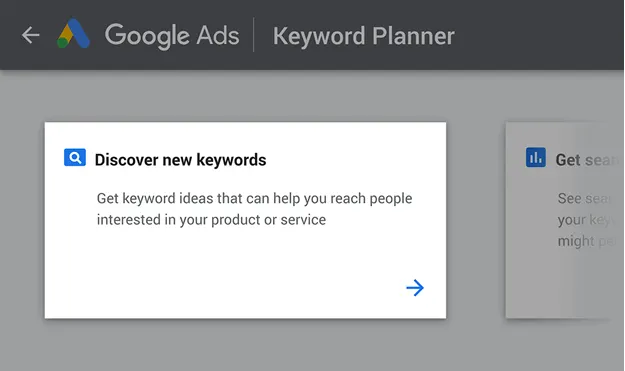
Image Source- Backlinko
- Search Volume: In 2026, Google Keyword Planner primarily shows search volume ranges unless the account has consistent ad spend. SEO professionals should treat this data as directional, not exact.
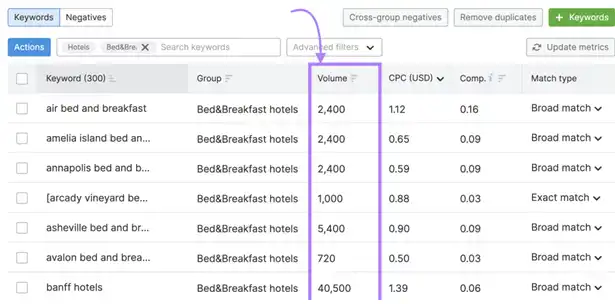
Image Source- Semrush
- Competition Level: The “Competition” column reflects how many advertisers are bidding on a keyword in Google Ads. It does not indicate how difficult a keyword is to rank for organically.
How to Set Up Google Keyword Planner
Here’s how to set up Google Keyword Planner in a few simple steps:
Step 1: Access Google Keyword Planner
Visit ads.Google.com to access the Google Ads account page.
Use your credentials to log into your account if you already have one.
Step 2: Navigate to Keyword Planner
From your Google Ads dashboard, click Tools & Settings → Planning → Keyword Planner.
Step 4: Choose Your Research Goal
Get seek volume and forecast, as well as new keywords, are the two options that Google Keyword Planner gives. Select a choice from these based on your preference.
Step 5: Type the URL and keyword.
Enter keywords and terms associated with your business, merchandise, or website within the newly created Keyword section. This can help Google produce the keyword-based totally on input.
Step 6: Filters for Keywords
You can follow suitable keyword filters based on location, language, search community, and data. This enables targeted audience targeting.
Step 7: View Keyword Metrics
Keyword Planner provides metrics such as average monthly searches, competition level, and suggested bids for each keyword. Use this information to prioritize keywords that are most relevant to your goals.
Step 8: Save or Download the Keywords
To keep your keywords directly on your Google Ads account, download them as a CSV document. This lets you use or analyze the key phrases in a while.
Step 9: Make a Campaign Plan
You can utilize the applicable key phrases you’ve observed to help you organize your Google Ads campaigns. You can estimate capability site visitors, important spending, and greater with the resource of Keyword Planner.
Also Read: Best Keyword Research Tools to Dominate the SERPs
How to Use Google Keyword Planner
Discover New Keywords
- Access Keyword Planner: After logging in to your Google Ads account, open Tools & Settings → Planning → Keyword Planner.
- Launch a new Lookup: Select the “Discover New Keyword” option when you are in the keyword Planner interface.
- Put the Seeds Keyword Here: Enter initial terms and phrases related to your business enterprise, product, and others.
- Streamline Your Lookup: Indicate your chosen search community, language, and area for targeting. This setting ensures that the keywords generated are relevant to your intended market.
- Examine Potential Keywords: The keyword planner will list applicable keywords and information on competition level, average month searches, and recommended bids. Consider these recommendations to find keywords that are pertinent to your campaign.
Get Search Volume and Forecasts
- Enter Keyword Planner: Return to your Google Ads account and select Keyword Planner.
Opt for “Get search volume and forecasts.”
With this option, you may calculate site visitors and overall performance estimates for specific keywords.
- Type Your Keywords Here: Put the phrases you want to look at right here. You may also enter key phrases and separate them by commas.
- Enhance Your Targeting: As within the previous step, specify your centered options to get the correct forecasts.
- Review the Forecasts: Forecast data in Keyword Planner is modeled based on historical ad performance and should be used for budget estimation—not performance prediction.
Limitations of Google Keyword Planner for SEO
While Google Keyword Planner is widely used for keyword discovery, it is primarily designed for paid advertising, not organic SEO.
Key limitations for SEO professionals include:
-
Search volume is displayed in broad ranges, not exact numbers
-
Keyword competition reflects advertiser bidding, not ranking difficulty
-
No insights into SERP features, backlinks, or content competition
-
Data is optimized for Google Ads campaigns, not blog or content planning
For SEO-focused keyword research, Keyword Planner should be used alongside tools like Google Search Console, Semrush, or Ahrefs.
Bonus Strategies and Tips
Save Money
- Utilize Negative Keywords: Identify and utilize negative keywords in your campaign to prevent your ads from showing for irrelevant searches.
This ultimately saves money and improves the relevancy of your ads.
- Focus on Long-tail Keywords: Long-tail keywords often have less competition and cost-per-click than broad keywords.
Targeting this keyword can help you reach a more targeted audience while potentially lowering your advertising cost.
Export Your Data
- Utilize Export Functionality: Use Keyword Planner’s export feature to download a keyword list, search volume data, and forecasts.
This enables you to analyze the data offline, integrate it into other tools, or share it with team members.
- Regular Data Backups: Regularly export your data to ensure you have a backup copy, especially when making significant changes to your campaign or strategy.
Unlock the Extract Data
- Utilize Match Types: As of 2025–2026, Broad Match keywords use Google’s AI and intent modeling, making them less keyword-dependent and more context-based. Advertisers must rely heavily on negative keywords and search term reports.
- Analyze Search Term Reports: Review search term reports to uncover the search queries that trigger the ads.
This can help you refine your keyword targeting and eliminate irrelevant traffic.
Understand Your Audience
- Use Demographic Targeting: Leverage demographic targeting options to tailor your ads to specific age groups, genders, parental status, and household income levels.
- Analyze Audience Insights: Integrate insights from Google Analytics 4 (GA4) to analyze user behavior, conversions, and intent signals that Keyword Planner alone cannot provide.
Conclusion
In 2026, Google Keyword Planner continues to be a useful starting point for understanding keyword demand and planning paid campaigns. However, as search behavior becomes more intent-driven and AI-influenced, relying on it alone is no longer enough for effective SEO. Treat its data as directional and combine it with insights from Search Console, third-party SEO tools, and AI-assisted research to build a more accurate and sustainable keyword strategy.
The real value lies in how effectively this data is translated into actionable SEO decisions. By using Keyword Planner alongside complementary tools and audience insights, businesses can reduce wasted spend, target the right search intent, and build content strategies that drive consistent organic growth.
At ResultFirst, we help brands go beyond keyword discovery by turning data-driven insights into performance-focused SEO strategies. If you’re looking to strengthen your keyword research approach and achieve measurable results from organic search, our team is here to help you move from planning to execution with confidence.
Also Read: How to Do Keyword Research for An ecommerce Website?
FAQ’s
WHAT TO READ NEXT
READY TO BUILD PREDICTABLE ORGANIC GROWTH?
We are the only TOP SEO services agency providing Real Results in a Real Performance model. We help growth hungry companies outperform their competition and achieve 300%+ growth in their digital marketing initiatives.
- San Jose, CA, 95120

- +1-888-512-1890

- sales@resultfirst.com

300K+
KEYWORDS RANKED
546M+
REVENUE GENERATED
18 Years
SOLVING COMPLEX SEO
150+
TEAM MEMBERS