



 sales@resultfirst.com
 +1-888-512-1890

How to Use Google Keyword Planner For SEO In 2027

To use Google Keyword Planner for SEO in 2027, start by accessing the tool through a Google Ads account, then enter a relevant keyword, website, or product category to generate keyword ideas.
Google Keyword Planner is a free Google Ads tool that helps you discover keywords, review estimated search demand, compare advertiser competition, and forecast potential Search campaign performance. It is primarily designed for paid search, but SEO professionals can also use its keyword data as one input in a broader research process.
In 2027, effective keyword research goes beyond search volume. You need to consider search intent, relevance, seasonality, location, commercial value, and the difference between paid-search competition and organic ranking difficulty. Keyword Planner provides useful search demand and advertising data, but it is not a complete SEO research tool.
This guide explains how to access Google Keyword Planner, find keyword ideas, interpret its metrics, use forecasts, and apply the data to SEO and Google Ads.
What Is Google Keyword Planner?
Google Keyword Planner is a keyword research tool available inside Google Ads. It helps advertisers discover keywords related to their products, services, or website and estimate search activity and advertising costs.
The tool has two primary research options:
- Discover new keywords: Find keyword ideas based on words, phrases, products, services, or a website.
- Get search volume and forecasts: Analyze a list of existing keywords and estimate potential campaign performance.
Keyword Planner can show metrics such as average monthly searches, competition, and top-of-page bid ranges. By default, average monthly searches are based on a 12-month period, while forecasts are refreshed daily using recent data from the previous 7–10 days and adjusted for seasonality.
For SEO, these numbers should be treated as supporting evidence rather than a complete measure of ranking opportunity.
Is Google Keyword Planner Free to Use?
Google Keyword Planner has no separate subscription fee. It is part of Google Ads.
However, you need to set up a Google Ads account and complete the required account setup including entering billing information, to access basic Keyword Planner functionality.
How Do You Access Google Keyword Planner?
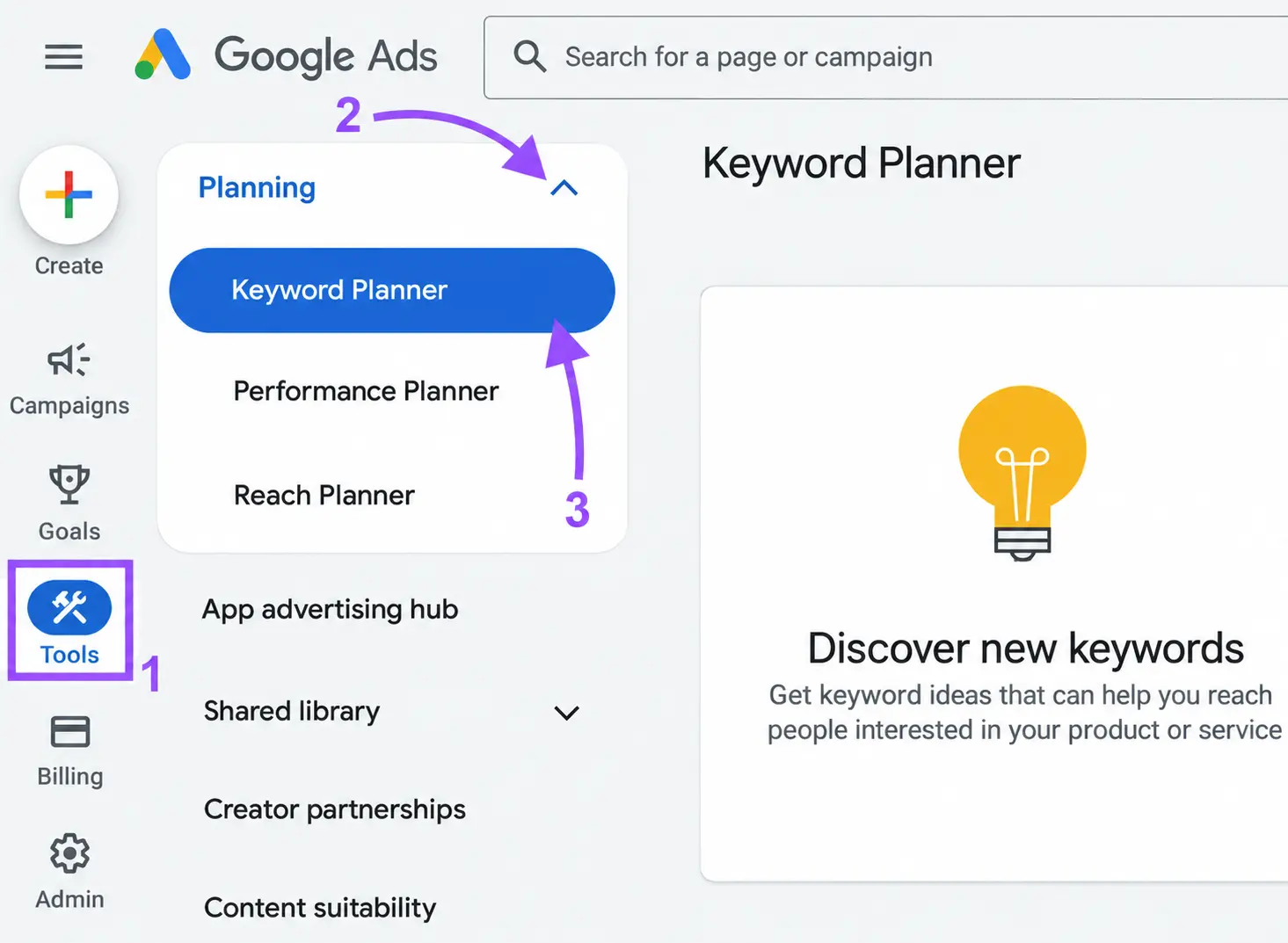
To access Keyword Planner:
- Sign in to your Google Ads account.
- Open the Tools section.
- Go to Planning.
- Select Keyword Planner.
- Choose either Discover new keywords or Get search volume and forecasts.
The exact interface can change as Google updates Google Ads, but the two core research workflows remain focused on discovering keyword ideas and evaluating an existing keyword list.
How Do You Use Google Keyword Planner for SEO?
Access the Google Ads Keyword Planner and select Discover new keywords. Enter relevant words, phrases, products, services, or a website to generate keyword ideas.
Step 1: Enter Your Seed Keywords
Enter words or phrases that describe your business, product, service, or topic.
For example, an online furniture store might start with:
- office furniture
- ergonomic office chair
- standing desk
- home office desk
- office storage
Use specific seed terms instead of extremely broad words. A focused starting point generally produces more relevant keyword ideas.
Step 2: Add Your Website
Keyword Planner can also generate ideas from a website.
Enter a relevant website or page and let Google identify keyword ideas related to its content. You can also combine a keyword with a website to provide more context.
For a large website, use a relevant product or service page rather than relying only on the homepage.
Step 3: Set Your Target Location and Language
Choose the location and language that match your target audience.
If you sell products only in the United States, research the United States rather than looking at worldwide data.
For local businesses, narrow the targeting to the relevant country, region, city, or other available geographic area.
This makes the keyword data more useful for your actual audience.
Step 4: Review the Keyword Ideas
Google will generate a list of related keyword ideas.
Do not immediately select keywords with the highest search volume.
Instead, evaluate each keyword based on:
- Relevance
- Search intent
- Search demand
- Commercial value
- Competition
- Location
- Seasonality
- Your product or service offering
A lower-volume keyword with strong buying intent can be more valuable than a high-volume keyword that is informational and unrelated to your conversion goal.
Step 5: Export and Validate Your Shortlist
Export relevant keyword ideas for further analysis. Group related terms by search intent and topic, then check the current Google search results to understand which page types rank for those queries.
Use Google Search Console to review existing search performance and an SEO platform to assess organic competition. Keyword Planner can help identify opportunities, but it does not replace SERP analysis or organic keyword difficulty research.
Also Read: 11 Best Keyword Research Tools
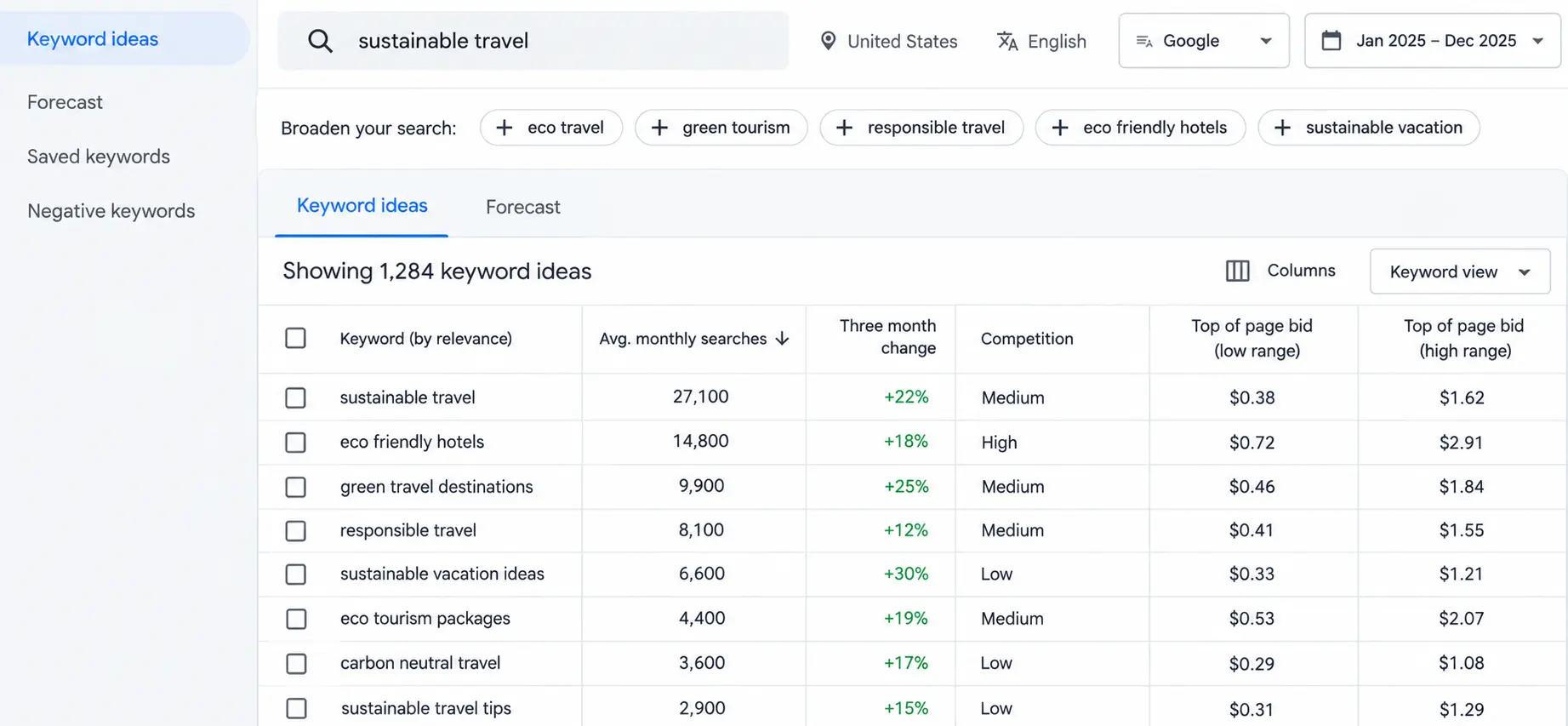
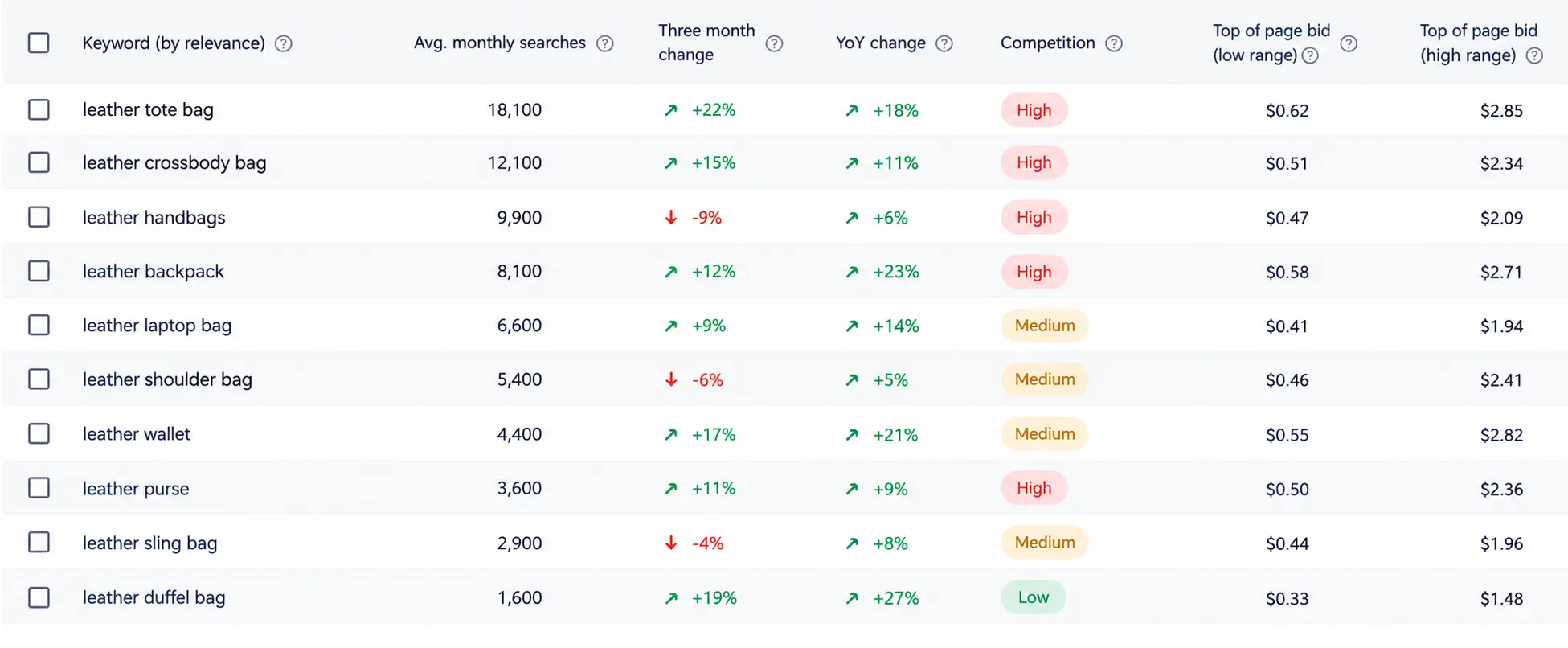
How Do You Understand Keyword Planner Metrics?
You can understand Keyword Planner metrics by looking at search demand, advertiser competition, bid ranges, and forecasts together rather than relying on a single number.
1. Average Monthly Searches
Average monthly searches indicate the average number of searches for a keyword and its close variants based on the selected settings and date range.
The metric is useful for understanding relative demand, but it should not be interpreted as guaranteed website traffic.
Search volume is not the same as clicks. A keyword may receive thousands of searches while generating substantially fewer clicks for a particular website.
Google also allows users to change date ranges, which is important for seasonal businesses.
2. Competition
The Competition metric refers to advertiser competition.
It indicates how many advertisers are bidding on a keyword relative to other keywords in Google Ads.
This is an important distinction:
Google Ads competition is not the same as organic SEO difficulty.
A keyword can have high advertising competition but relatively achievable organic rankings. Conversely, a keyword can have low advertising competition while being difficult to rank for organically because established websites dominate the search results.
Do not use the Competition column as an SEO difficulty score.
3. Top-of-Page Bid
Keyword Planner can provide top-of-page bid ranges.
These figures can help indicate the commercial value of a keyword in paid search. Keywords associated with valuable products, services, or transactions may attract stronger advertiser interest.
However, a high bid does not automatically mean the keyword is the right target for your business.
4. Search Volume Trends
Keyword Planner can help you examine search activity across different periods.
This is particularly useful for seasonal industries.
For example, a retailer selling holiday products may see significant differences between search activity during different months.
Look beyond the annual average when timing matters.
How Do You Choose and Prioritise Keywords?
Choose keywords by evaluating their relevance, search intent, estimated demand, business value, and organic competition. Keyword Planner helps you explore potential opportunities, but you need additional research to decide which terms deserve priority.
Step 1: Filter Out Irrelevant Keywords
Remove terms that do not match your products, services, audience, or content goals. Use Keyword Planner’s available filters to narrow the list by keyword text, search volume, and other relevant metrics.
Do not keep a keyword simply because it has high search demand. If it attracts the wrong audience, it may not contribute to your SEO objectives.
Step 2: Identify Search Intent
Determine what users want to accomplish when they search for a term.
- Informational: Users want to learn something, such as how to choose an ergonomic office chair.
- Commercial: Users are comparing options, such as the best office chairs for back support.
- Transactional: Users are closer to purchasing, such as buying an ergonomic office chair.
- Navigational: Users are looking for a specific brand or website.
Match the keyword to a page that satisfies the underlying need. An informational query may suit a guide, while a purchase-focused query may be better suited to a product or category page.
Step 3: Assess Demand and Business Value
Review estimated search demand alongside the value of attracting that audience. A lower-volume keyword can still be worthwhile if it closely matches your offering and reaches users with a clear need.
Consider conversion potential, product or service relevance, and the purpose of the page. Do not use search volume as the sole measure of keyword value.
Step 4: Evaluate Organic Competition
Search for your shortlisted terms in Google and examine the results. Look at the types of pages ranking, the intent they satisfy, the quality of their content, and whether established brands dominate the results.
Use an SEO tool if you need a keyword difficulty estimate, but treat that metric as a guide rather than a guarantee of ranking success.
Step 5: Identify Relevant Long-Tail Keywords
Long-tail keywords are more specific search phrases that often express a particular need or use case. To discover them, start with a broader term in Keyword Planner and review the related suggestions.
For example, an online furniture store could investigate phrases such as:
- Best ergonomic chair for a home office
- Compact desk for a small apartment
- Adjustable standing desk for home use
These examples illustrate different customer needs, not verified search-volume opportunities. Check actual search data and results before prioritising them.
Step 6: Assign Keywords to the Right Pages
Group keywords that share the same intent and can be answered effectively by one page. Map each group to an existing page or identify where new content is needed.
Avoid creating separate pages for minor keyword variations when one well-developed page can satisfy the same search intent.
The goal is to build a relevant, prioritised keyword list that supports useful content and clear page targeting, not simply to collect as many keywords as possible.
How To “Get Search Volume and Forecasts”?
Use Get search volume and forecasts when you already have a list of keywords and want to review their historical search metrics or estimate potential Google Ads campaign performance.
To use this feature:
- Open Keyword Planner in your Google Ads account.
- Select Get search volume and forecasts.
- Enter or paste your keyword list, or upload a supported file.
- Select the option to continue and review the available metrics.
- For campaign forecasting, assess the projected performance under the relevant budget, bid, targeting, and campaign settings.
This workflow can help you assess an existing keyword list without researching each term individually. For SEO, use the historical search metrics to support keyword evaluation, then validate the shortlisted terms through organic SERP analysis and Search Console data.
What Are Google Keyword Planner Forecasts?
Keyword Planner forecasts estimate potential advertising performance based on factors such as bids, budgets, seasonality, and other campaign conditions. Depending on your account setup, they may include estimated impressions, clicks, and conversions.
These figures are planning estimates, not guaranteed outcomes. They also do not predict organic rankings or guarantee the traffic an SEO page will receive.
Use forecasts to inform paid search planning. For organic search, evaluate keyword relevance, search intent, current ranking pages, and your website’s performance separately.
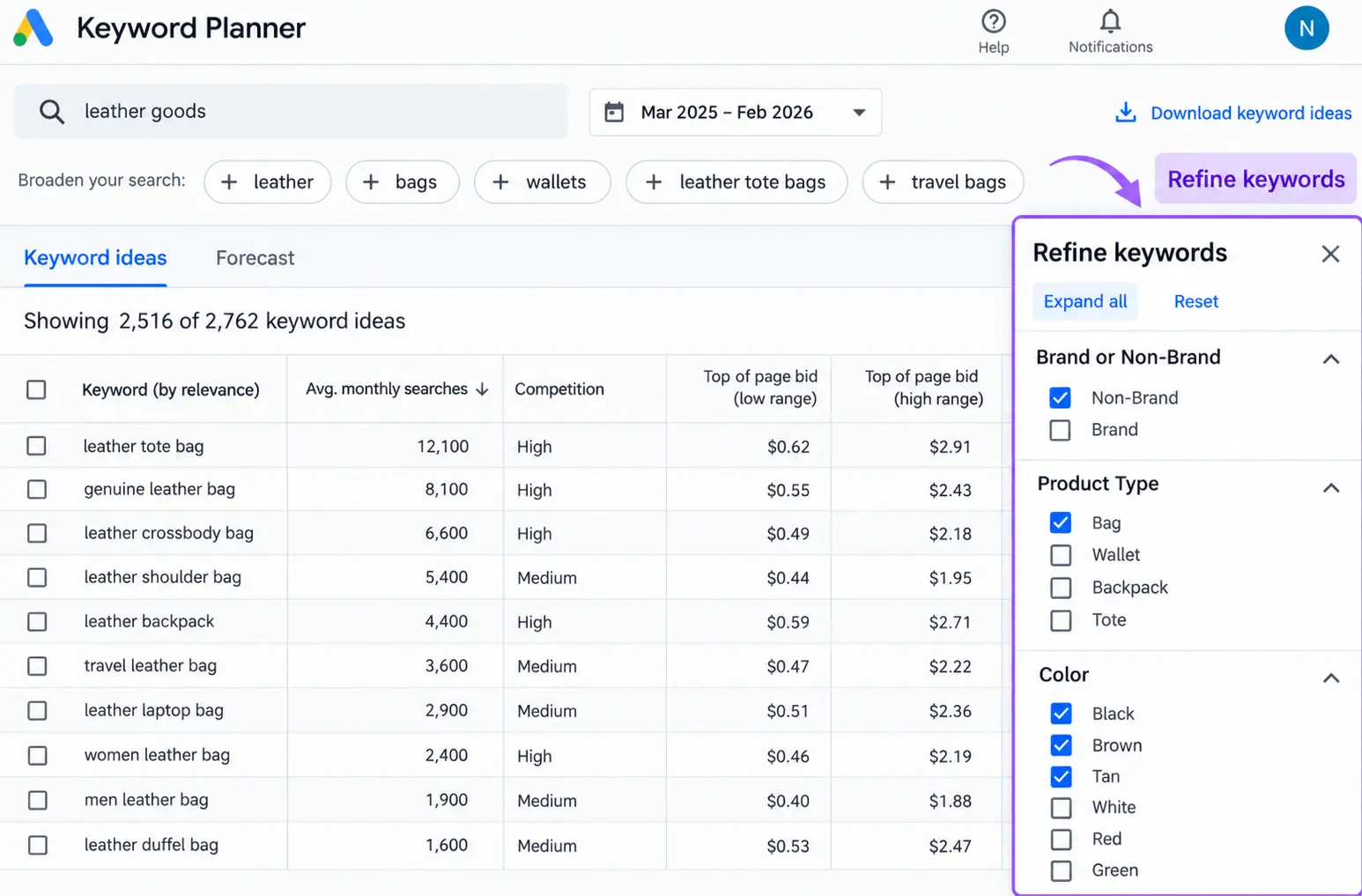
How Do You Filter Keywords in Keyword Planner?
Use Keyword Planner’s filters to narrow a large list of keyword ideas and focus on terms that match your SEO or advertising goals.
Useful filters can include:
- Keyword text
- Average monthly searches
- Competition
- Top-of-page bid ranges
- Other available campaign-related metrics
You can also refine keywords by categories and review groups of terms with similar themes.
Filtering is particularly useful when Keyword Planner produces a large list.
How Do You Find Long-Tail Keywords With Keyword Planner?
Find long-tail keywords by entering a broad seed keyword into the “Discover new keywords” tool and reviewing the more specific phrases it generates. Filter the results to identify longer queries that closely match your topic, product, or service.
For example, a broad keyword such as CRM software may generate more specific phrases such as:
- best CRM for small businesses
- CRM for real estate companies
- affordable CRM software for startups
Evaluate each keyword based on relevance, search intent, demand, and business value. Do not assume that longer keywords automatically have lower competition or cost.
The goal is to identify specific keyword variations that reflect real customer needs, not simply create the largest possible keyword list.
Can Google Keyword Planner Be Used for Content Planning?
Yes, but it should be used as a starting point.
Suppose Keyword Planner identifies several related searches around a product.
Instead of creating a separate article for every minor variation, group keywords by search intent and topic.
For example, a website could build:
- One comprehensive guide for informational searches
- A comparison page for commercial investigation
- A product page for transactional searches
- Location pages for relevant local searches
This prevents unnecessary keyword duplication and creates a more logical content structure.
The goal is not to place one keyword on one page.
The goal is to create useful pages that satisfy the searcher’s underlying need.
What Are the Best Google Keyword Planner Tips for 2027?
Use these practices to get more value from Keyword Planner when planning your SEO strategy.
- Combine keyword sources: Use Keyword Planner alongside Google Search Console, Google Trends, and organic SEO tools to build a more complete view of search opportunities.
- Review close variants carefully: Related phrases may be grouped in search metrics. Validate individual terms before assuming each represents a separate opportunity.
- Investigate seasonal demand: Review historical trends when planning content for seasonal products, events, or services.
- Check the actual search results: Confirm the intent and page formats that currently rank before choosing a keyword target.
- Improve existing pages where appropriate: Review Search Console queries to find relevant terms for which existing pages already receive impressions.
- Revisit priorities when conditions change: Update your keyword research when products, competitors, customer needs, or business priorities change.
The most effective workflow combines Keyword Planner’s search data with organic search analysis and your own website performance. No single metric can tell you which keyword will deliver the best SEO results.
Final Takeaway
Google Keyword Planner is a useful starting point for discovering keyword opportunities and understanding search demand. By evaluating search intent, relevance, and business value, you can build a keyword strategy that supports your content planning and SEO goals.
However, effective SEO involves more than finding the right keywords. Your website also needs relevant content, well-optimised pages, a strong site structure, and a strategy to improve organic visibility over time.
At ResultFirst, our SEO services help businesses identify valuable search opportunities, optimise website content, and build data-driven strategies to attract relevant organic traffic. Whether you’re improving an existing website or planning a new SEO strategy, we can help align your search efforts with your business goals.
FAQ’s
WHAT TO READ NEXT
READY TO BUILD PREDICTABLE ORGANIC GROWTH?
We are the only TOP SEO services agency providing Real Results in a Real Performance model. We help growth hungry companies outperform their competition and achieve 300%+ growth in their digital marketing initiatives.
- San Jose, CA, 95120

- +1-888-512-1890

- sales@resultfirst.com

300K+
KEYWORDS RANKED
546M+
REVENUE GENERATED
18 Years
SOLVING COMPLEX SEO
150+
TEAM MEMBERS