


 sales@resultfirst.com
 +1-888-512-1890
How to Get Your Business to Rank #1 on Google Maps in Your City

Think about this for a second. A potential customer is standing two blocks from your shop right now. They pull out their phone. They search for exactly what you sell. And they walk into the business that shows up first, which is probably not yours. That is the real cost of ignoring Google Maps SEO.
Remember: Just because your business appears in an area doesn’t mean Google will rank it there. Listings create presence, not rankings.
Your listing is not just a pin on a map. It is a full marketing tool that drives discovery, builds trust, and sends customers through your door. But here’s the thing that many business owners overlook. Almost 90% of consumers turn to Google Maps when searching for local businesses, and a whopping 84% of those visits are driven by keyword searches rather than people who already know your brand. So, it’s not a matter of whether you should optimize your listing; it’s really about how quickly you can get started.
What Is Google Maps SEO and Why Does It Matter for Small Businesses
Google Maps SEO is the process of using every feature inside Google Maps to make your business easier to discover. Large companies have entire teams doing this. Small businesses, the ones that need it most often, skip it entirely.
Google Maps SEO is not just about being visible. It is about being positioned above your competitors when the right customer searches at the right moment. A well-optimized listing is kind of like a spotlight for your business; it quietly pulls in the people who are actually ready to buy, not just those drifting by while scrolling through their feeds.
For smaller businesses, this matters even more than it does for big brands. Picture a local eatery, a nearby plumber, or a family-run salon; these businesses do best when the community finds them, on purpose. Google Maps is where that discovery does happen every single day.
Why Ranking Higher on Google Maps Changes Everything for Your Business
Just being in proximity doesn’t give you a top spot. Google looks at all kinds of signals before it decides which three businesses are going to stand out right at the top of a local search. Still, before we get into the playbook or certain tactics, it’s important to understand what’s actually at stake when you pull yourself up the rankings, higher than the rest.
Around 76% of people who look up a nearby business using their smartphone end up going to a place within one day. If your business is not in that top three, the “Local 3-Pack”, most of your potential customers never see you at all.
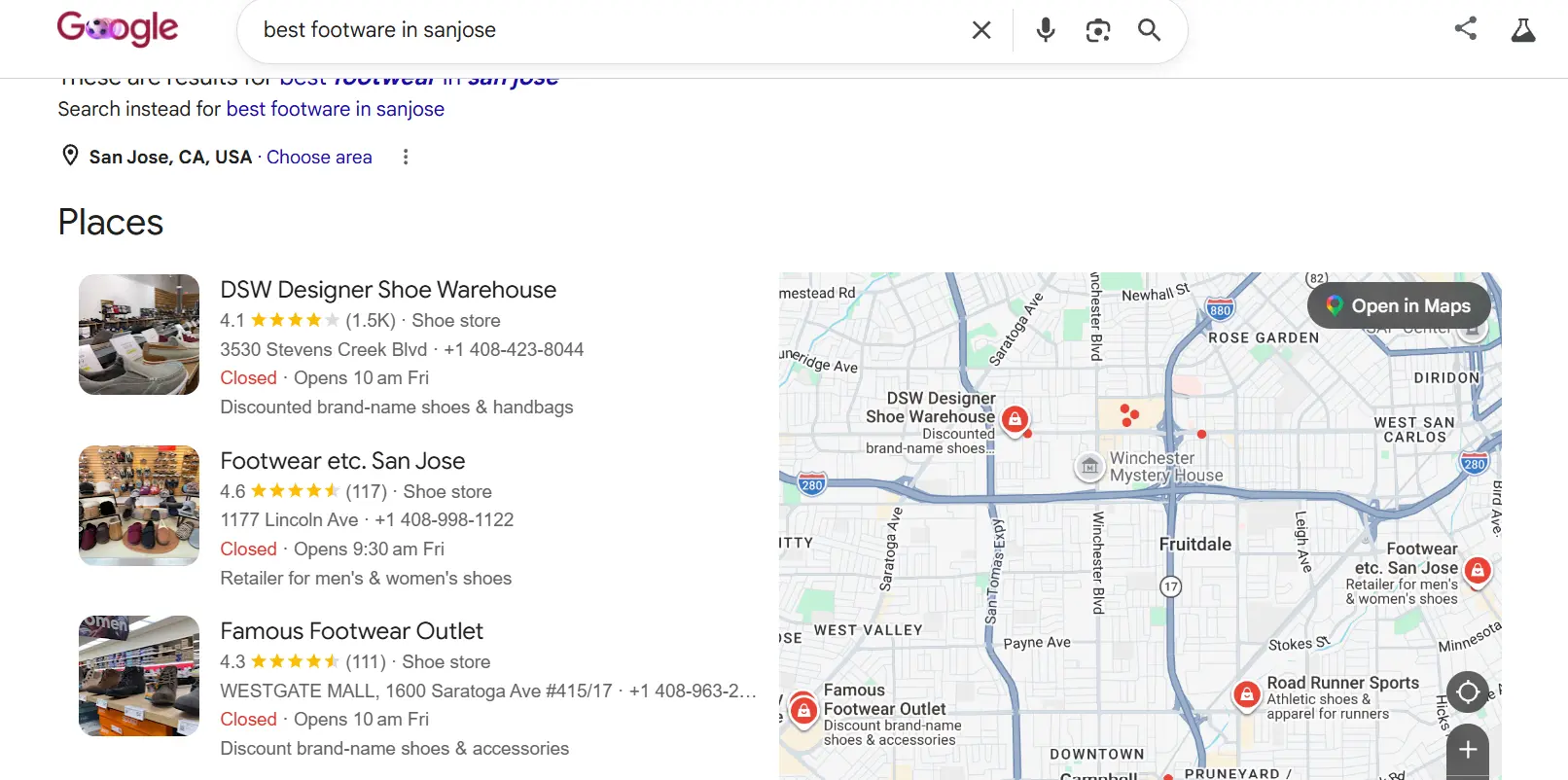
Source: Google
Here is something even more important. About 84% of the time, people end up on a Google Maps listing because of some keyword search, not because they just type the business name directly. They might look up “roof repair near me” or “Italian restaurant open now,” and then Google decides who shows up first or who even gets picked. That decision happens based on your listing quality, not your reputation alone.
Ranking in that Local 3-Pack has another massive benefit most business owners overlook. 46% of all Google searches carry local intent. When your Google Maps listing ranks in the top three, it also shows up on the first page of regular Google Search results. That means one optimized listing earns you two placements at once.
86% of consumers use Google Maps to look up a business before visiting. This means your listing is often the first impression you make before your website, before your social media, before anything else.
| What Happens When You Rank Higher | The Impact |
| More people see your listing | Exposure to ready-to-buy local customers |
| More calls and direction requests | Direct revenue-generating actions |
| You appear in Google Search too | Double visibility from one listing |
| Higher trust and credibility | Customers choose you over unknown competitors |
| More reviews flow in naturally | Ranking improves even further over time |
Steps To Get Your Business To Show Up First On Google Maps In Your City
Step 1: Add Your Business to Google Maps and Own It Completely
You cannot rank higher if you do not have a listing. And even if someone else already added your business, a customer, a competitor, or Google itself, that does not mean you control it.
Go to google.com/maps or business.google.com and search your business name. Two things will happen:
- Your business appears in the dropdown: It already has a listing. Click it and claim ownership.
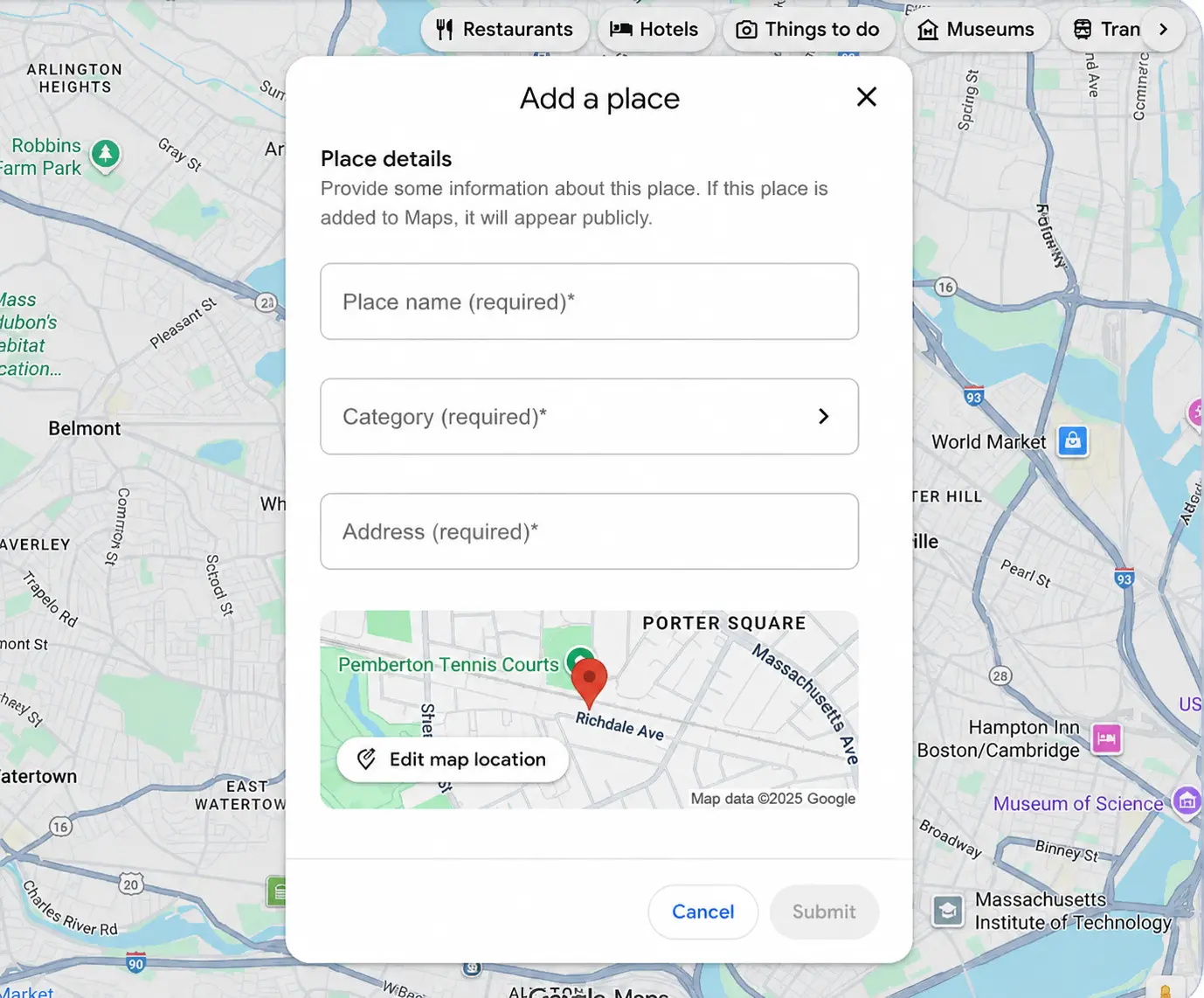
- Nothing shows up: Select “Add a missing place” or “Create a business with this name” and build your listing from scratch.
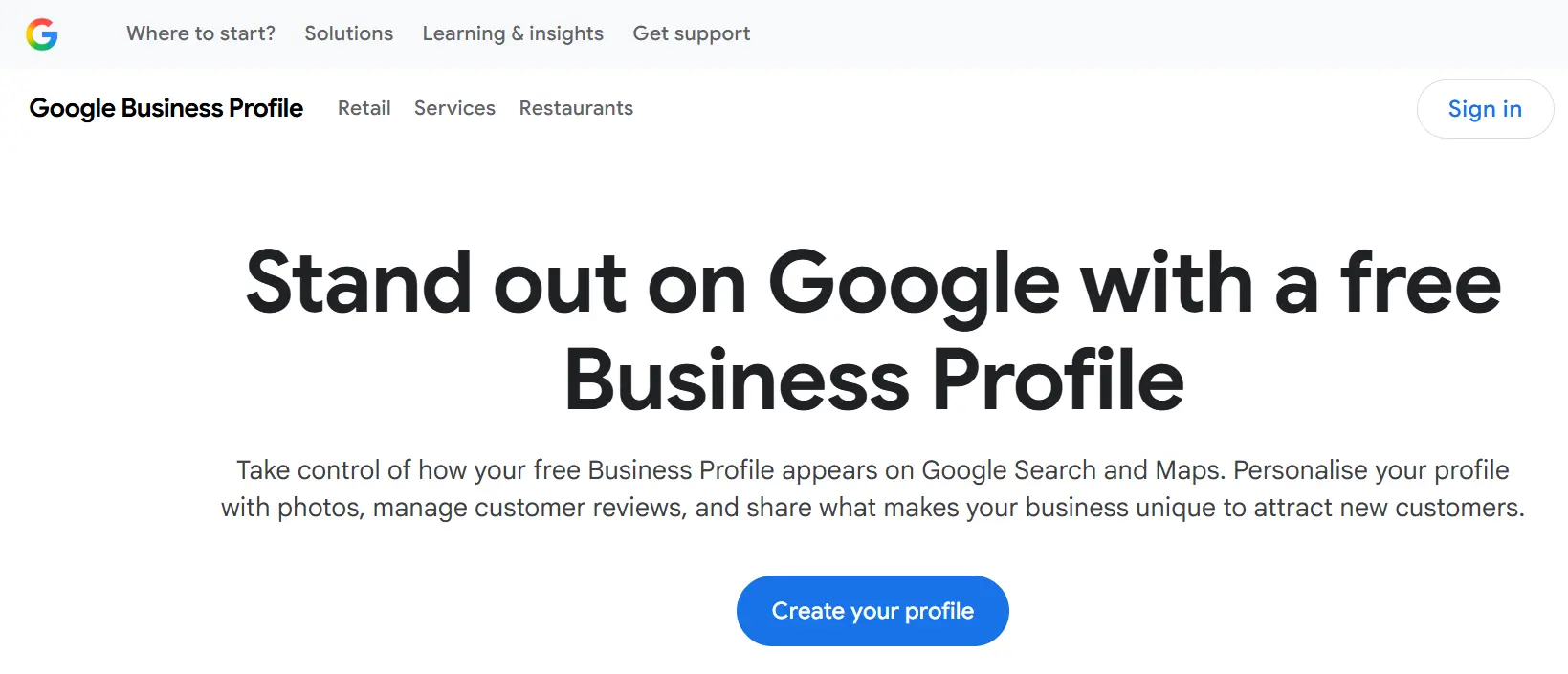
Here is something most business owners do not know. Anyone in the world can add a business to Google Maps. A customer who visited you once could have listed you years ago with an old phone number and wrong hours. Only the verified owner has the power to fix that. Claiming your listing through a Google Business Profile account is the step that gives you that control.
What Claiming Your Listing Actually Unlocks
An unclaimed listing shows the bare minimum: a name, a rough location, and maybe a photo someone uploaded. A claimed and verified listing lets you add your full business description, your service menu, your hours, your photos, and your messaging features. The more information your listing contains, the higher Google ranks it. There is a direct relationship between completeness and ranking, and it starts the moment you claim ownership.
Verification usually takes 5 to 7 business days via postcard. Google mails a code to your business address. Enter that code in your dashboard and your listing becomes fully active.
Step 2: Fill Every Section of Your Google Business Profile Completely
Most business owners claim their profile and then leave it half-empty. This is one of the most common and costly mistakes in local SEO. Google rewards completeness. An empty field is a missed ranking opportunity.
Here is what to fill out and why each section matters:
- Business Name: Use your exact trading name. Do not add keywords here. “Joe’s Plumbing, Best Drain Cleaning in Chicago” gets flagged and can lead to suspension.
- Primary Category: This is the most important ranking field in your profile. Choose the category that best describes your core offering. A bakery should choose “Bakery,” not “Food Service.”
- Secondary Categories: Add every other relevant category. A bakery that serves coffee should also add “Coffee Shop.”
- Local Phone Number: Use a number with your local area code. Google treats toll-free 800 and 877 numbers as spam signals and ranks them lower.
- Business Description: You have 750 characters. Use the first half to describe what you do clearly. Use the second half to highlight what makes you different. Include natural keywords your customers would search.
- Hours: Keep them accurate. Update them for every holiday. Wrong hours create frustrated customers who leave negative reviews, and negative reviews hurt your ranking directly.
- Services and Products: List everything you offer. Add descriptions to each one. This helps Google match your listing to specific searches beyond your business name.
Google Maps ranks businesses it trusts. One of the clearest trust signals is consistency. Your business name and address must be identical across your Google listing, your website, your Yelp page, your Facebook profile, and every other online directory.
Source: Google
Step 3: Upload Photos That Show Customers What You Are Really Like
Google loves photos. Customers love photos even more. Businesses with photos on their Google Business Profile receive 42% more direction requests than businesses without photos. That single statistic should tell you everything you need to know about skipping this step.
A listing without photos shows a generic map image. It looks abandoned. It looks untrustworthy. Upload real high-quality images that show:
- The inside and outside of your location
- Your team working or serving customers
- Your products or completed projects
- Before-and-after shots if your work involves transformation
- Any awards, certifications, or notable features
Log in to your Google Business dashboard. Click “Photos.” Drag and drop your images. Add new ones every month. Google treats active listings as more trustworthy than dormant ones, and regular photo uploads are one of the easiest ways to signal that your business is active.
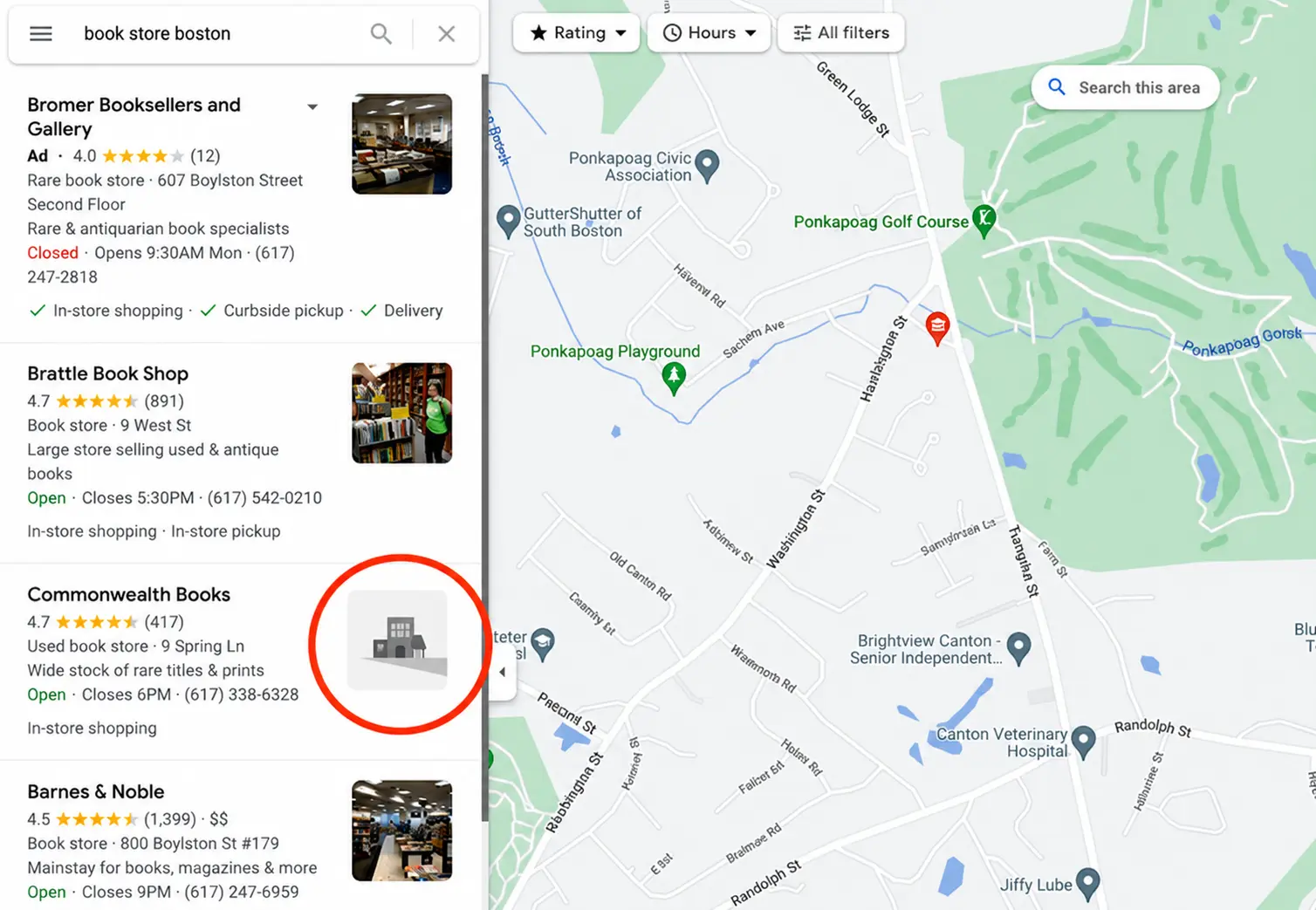
Image Source: Pinterest
Step 4: Get Google Reviews and Respond to Every Single One
Reviews are the most powerful prominence signal on all of Google Maps. Look at any business sitting at the top of local results in your city. It has more reviews than the businesses below it. That is not a coincidence.
Businesses are 2.7 times more likely to be considered reputable when they have a strong Google Business Profile with genuine reviews. Google measures both the quantity and quality of your reviews when calculating your ranking.
Here is how to build a steady flow of real reviews:
- Ask every satisfied customer in person right after the job is done
- Send a follow-up text or email with a direct link to your review page
- Add a QR code on receipts, invoices, and your front door
- Train every team member to make the ask a natural part of the conversation
Responding to reviews is just as important as getting them. Thank customers for positive feedback with a specific personal reply. Address negative reviews professionally and offer to make things right. Your responses tell future customers how you treat people, and they tell Google that you are an engaged, active business owner.
Never purchase fake reviews. Google detects them. The penalty is removal from Maps entirely, and recovery is far harder than starting from zero.
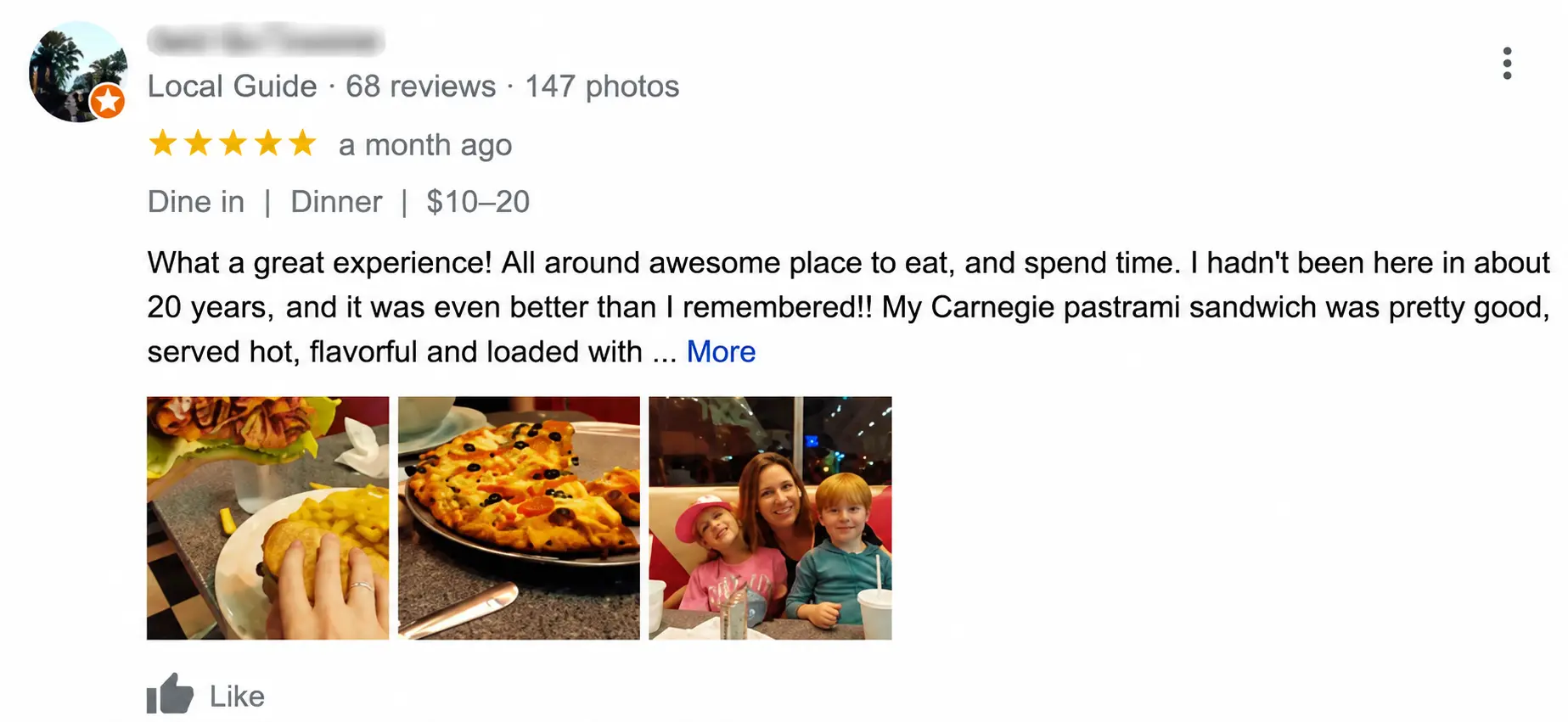
Image Source: Semrush
Step 5: Post Regular Updates to Keep Your Listing Active and Visible
Google Business Profile has a Posts feature that most businesses completely ignore. You can publish updates, offers, announcements, and events directly on your listing, and they appear right when someone finds you on Google Maps.
Posting regularly sends a clear signal to Google. It says this business is managed by a real owner who cares. Google gives ranking preference to listings that show consistent activity over listings that have not been touched in months.
Post at least once every 7 to 14 days. Keep posts short. Add a photo every time. Include a clear call to action. Here are ideas that work across almost any business type:
- A limited-time promotion or discount
- A new service or product announcement
- A seasonal tip related to your industry
- A customer success story or testimonial
- An update about your hours or location
Step 6: Remove Duplicate Listings Before They Kill Your Ranking
Google penalizes businesses with multiple listings for the same location. If your business has two or three profiles floating around on Google Maps, your review authority splits between them and your trust score drops for all of them.
Search every variation of your business name and address on Google Maps. Check for listings with old phone numbers, previous addresses, or slight name variations. If you find duplicates, claim them first and then request removal through your Google Business Profile dashboard.
These actions trigger account suspensions and must be avoided:
- Using a virtual office or PO box as your primary business address
- Creating separate listings for the same physical location
- Using the same phone number across multiple different listings
- Adding keyword phrases to your business name that are not actually part of your name
A suspended account disappears from Google Maps entirely. Prevention costs you nothing. Recovery costs you weeks.
Step 7: Make Sure Your Website Works Perfectly on Every Device
More than 60% of all Google searches happen on mobile devices. Your Google Maps listing links directly to your website. If that website loads slowly, breaks on smaller screens, or requires pinching and zooming to navigate, Google penalizes your Maps ranking for it.
Use a responsive design that automatically adjusts to any screen size. Test your site on a phone once a month. Check that buttons are easy to tap, that text is readable without zooming, and that pages load in under three seconds. Every friction point on your mobile site costs you both customers and rankings.
Step 8: Add Local Keywords Throughout Your Website Content
Your website is one of the most powerful off-listing tools you have for boosting your Google Maps position. Adding location-specific keywords throughout your site tells Google that you are a legitimate and prominent business in your specific area.
Add your city, neighborhood, and region to:
- Your homepage headline and first paragraph
- Your About page and Contact page
- Your service and product pages
- Your blog posts when relevant
- Image alt tags and page URLs
The more clearly you signal your location through your website, the more confident Google feels about ranking your Maps listing for local searches.
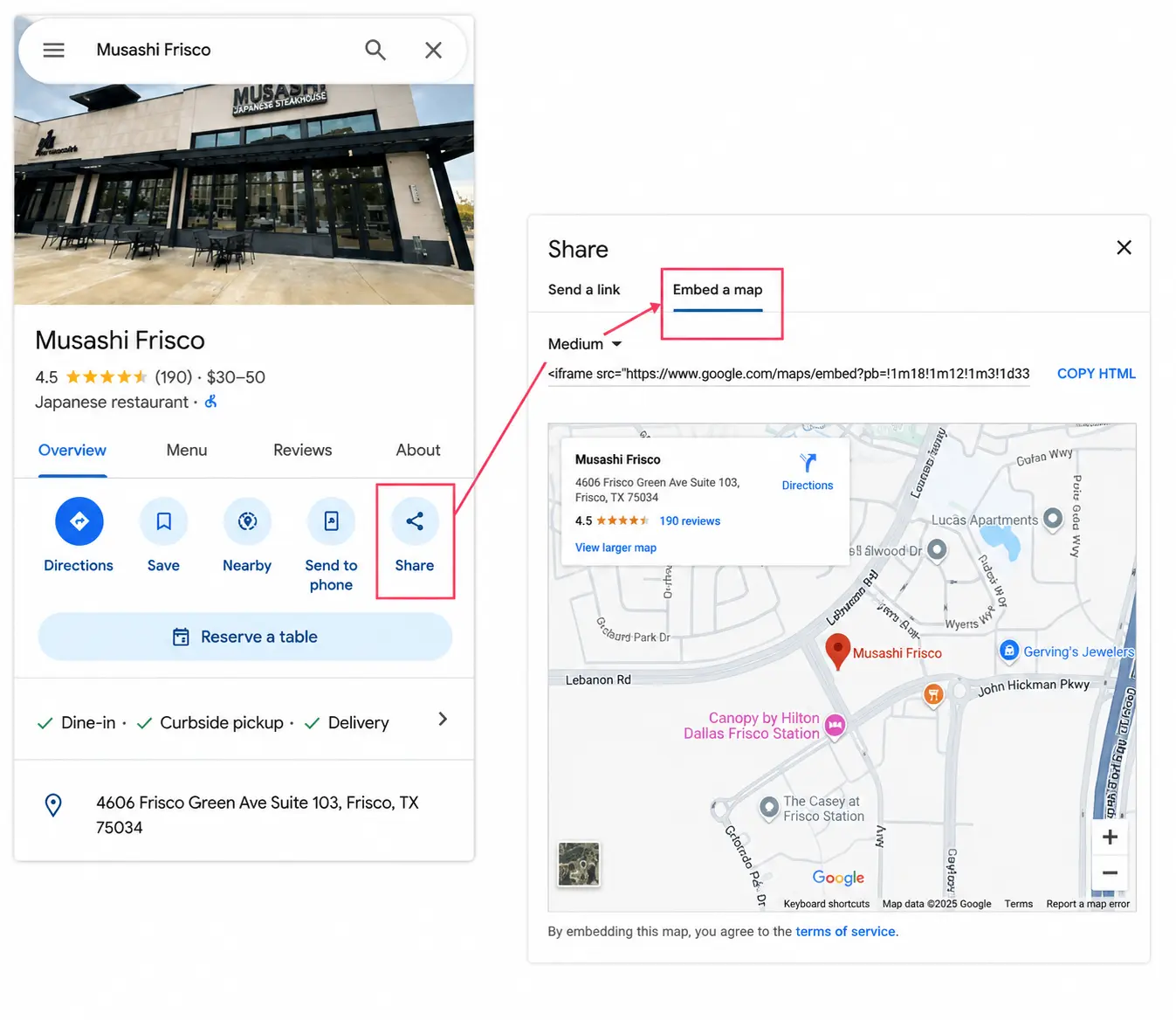
Image Source: Wordstream
Step 9: Embed a Google Map on Your Contact Page
This is one of the simplest steps in this entire guide and one of the most overlooked. Embedding a Google Map on your website, specifically on your contact page, tells Google that your business is physically located exactly where your listing says it is.
To do it:
- Search your business name on Google Maps.
- Click “Share.” Select “Embed a map.”
- Copy the HTML code and paste it into your contact page.
Make sure the address on the embedded map matches the address on your Google Business Profile exactly.
This small act reinforces your location authority. It connects your website directly to your Maps listing. And it gives visiting customers an easy way to get directions, which increases engagement signals that Google also factors into your ranking.
Step 10: Build Local Backlinks and Citations Across the Web
Backlinks are links from other websites pointing to yours. Google treats each backlink as a vote of confidence. The more credible local sites that link to you, the more Google trusts your business, and trust drives rankings.
Sites with more referring domains consistently rank higher in local search results. For local businesses, you do not need hundreds of links. Five to ten strong relevant local backlinks can make a measurable difference.
Here is where to start building them:
- Local Chamber of Commerce: Member directories almost always include a website link
- Local news websites: Offer to be an expert source or share a newsworthy business update
- Community event sponsorships: Sponsors typically get listed with a link on event websites
- Local business partnerships: Cross-promote complementary businesses on each other’s websites
- Guest posts on local blogs: Write something useful and earn a backlink in return
Start Today: Your Next Customer Is Already Searching
Google Maps has surpassed 2 billion monthly active users in early 2026, and the average person opens the app 50 times every month. Your next customer is searching right now. They are looking for what you sell in the city where you work. The only variable is whether your listing is optimized enough to show up when they do.
You do not need a big budget to rank first on Google Maps. You need a complete profile, a steady stream of real reviews, consistent information across the web, and a website that supports your local presence. Follow the steps in this guide one by one. Give it 60 to 90 days of consistent effort. The businesses that treat their Google Maps listing like the marketing tool it truly is always pull ahead of the ones that do not.
A strong Google Maps presence starts with a fully optimized Google Business Profile that helps your business appear when local customers are ready to buy. ResultFirst helps businesses improve local visibility through Google Maps optimization, Google Business Profile management, and proven local SEO services that support long-term growth. Get in touch with our team to build a stronger local presence.
Sources Referenced:
- https://www.semrush.com/blog/google-search-statistics/
- https://support.google.com/business/answer/10515606?hl=en
- https://www.digitalapplied.com/blog/local-seo-statistics-2026-data-points
- https://ahrefs.com/blog/google-maps-seo/
- https://www.wordstream.com/blog/google-maps-seo
- https://searchengineland.com/guide/near-me-search-optimization
FAQs:
WHAT TO READ NEXT
READY TO BUILD PREDICTABLE ORGANIC GROWTH?
We are the only TOP SEO services agency providing Real Results in a Real Performance model. We help growth hungry companies outperform their competition and achieve 300%+ growth in their digital marketing initiatives.
- San Jose, CA, 95120

- +1-888-512-1890

- sales@resultfirst.com

300K+
KEYWORDS RANKED
546M+
REVENUE GENERATED
18 Years
SOLVING COMPLEX SEO
150+
TEAM MEMBERS