



 sales@resultfirst.com
 +1-888-512-1890
How to Use Claude for SEO Audits: A Step-by-Step Guide

Running an SEO audit on Claude takes no more than 90 minutes, and that too without any subscription. It mainly depends on what type of version you are using and what type of audit output you expect.
For example, if you want to audit a webpage, you can upload the page content, a crawl export, or a Google Search Console CSV file into Claude.ai. It analyzes the data and provides a structured SEO report with key issues and optimization recommendations.
This is why many businesses now include Claude in their AI SEO Services workflow. Instead of spending hours reviewing spreadsheets, SEO teams use Claude to organize findings and speed up analysis. A Claude SEO audit combines content analysis with structured reporting. It reviews page copy, crawl data, and Search Console exports to identify technical errors, on-page optimization gaps, weak content, and missed ranking opportunities.
This guide breaks the process into clear steps built the way a professional SEO consultant actually runs an audit, with real prompts, real stats, and a full six-phase framework.
What Does Claude Actually Do In SEO Audit?
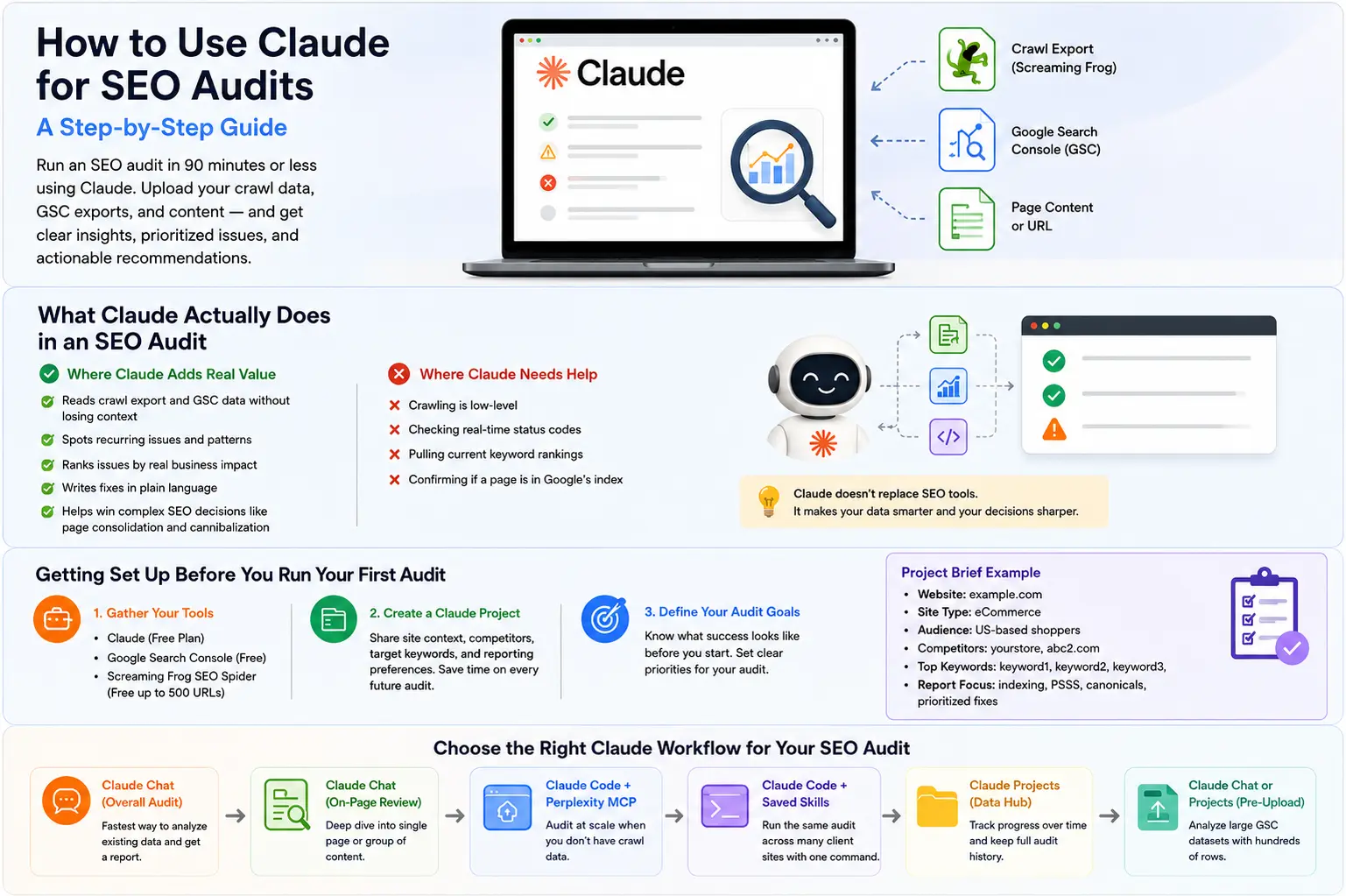
Claude is not a crawler. It won’t visit your website on its own unless you connect extra crawling tools. The real value of Claude begins once your SEO data is ready. Instead of simply displaying reports, it interprets the findings, uncovers opportunities, and recommends the next steps. That is why modern AI SEO Services use Claude alongside existing SEO platforms to improve audit quality and reduce manual effort.
With more than 18.9 million people monthly using Claude worldwide, the platform has become a trusted AI assistant for analyzing complex SEO data and improving audit efficiency
Where Claude adds real value:
- Reading crawl exports and GSC data without losing context across hundreds of rows in one pass
- Spotting repeated structural patterns instead of listing the same issue fifty separate times
- Ranking issues by real business impact rather than generic severity labels
- Writing fixes in plain language, your whole team can act on them immediately
- Working through judgment calls like page consolidation and keyword cannibalisation, where the answer depends on weighing several factors at once
Where Claude needs help from other tools:
- Crawling a live URL on its own
- Checking real-time status codes
- Pulling current keyword rankings
- Confirming whether a page actually sits inside Google’s index
Why This Distinction Changes Your Results
Many crawlers find every broken link and duplicate tag across a site. Claude tells you which of those problems is actually suppressing rankings right now and which one can sit in a backlog for a month. That split is the entire value proposition behind treating Claude as part of your AI SEO Services stack rather than a replacement for it.
A prompt naming the page type, the target keyword, and the CMS produces a site-specific fix list. A prompt that just says “audit my site” produces a checklist you could have found on any blog. Feed Claude real data with real context, and the output changes completely.
Getting Set Up Before You Run Your First Audit
Good audits start before you even open a chat window. Spend fifteen minutes preparing your tools once, and every session after that moves noticeably faster.
| Tool | Purpose | Cost |
| Claude | Analyzes and prioritizes your data | Free plan covers most sites |
| Google Search Console | Supplies real click and position data | Free |
| Screaming Frog SEO Spider | Crawls your site and exports raw data | Free up to 500 URLs |
Screaming Frog’s free tier alone covers roughly 500 URLs, which is enough for most small business sites and mid-size blogs without paying for the licensed version.
Build a Project, So You Stop Repeating Again
Claude Projects stores your site context permanently. Set this up once, and every future audit conversation starts already knowing your business.
Add a short brief covering:
- Your website and what it does
- Your target audience and location
- Your main competitors with URLs
- Your top keywords
- Your preferred report format
Paste something close to this into your project instructions:
| You are a senior SEO auditor working on [website URL].Site type: [describe]Audience: [describe]Competitors: [list 2-3 with URLs]Target keywords: [list top 5-10]Always format output with clear headings, PASS/WARN/FAIL labelswhere applicable, and a prioritized fix list at the end. |
Remember: Every chat inside that project now inherits this background automatically. No more retyping the same paragraph five times a week.
Selecting the Best Claude Workflow for Your SEO Audit
Claude offers three distinct paths for SEO audit work. Picking the correct one saves time and produces sharper output, and it’s the first decision any agency offering AI SEO Services has to get right before touching a client site.
| Situation | Best Workflow | Why it fits |
| One-off audit using existing crawl data | Claude chats with a triage prompt | No setup, fastest path to a report |
| Reviewing a single page or piece of content | Claude chats with an on-page prompt | Deep focus without extra tooling |
| Auditing a live URL with no crawl export | Claude Code with Puppeteer MCP | Visits and renders the page directly |
| Running the same audit across many client sites | Claude Code with a saved skill | One command repeats the full process |
| Managing the same site every month | Claude Projects with a delta prompt | Keeps full history without re-explaining |
| Analyzing a large GSC dataset | Claude chat or Projects with file upload | Handles hundreds of rows at once |
Phase 1: Technical Health Audit
Technical problems compound quietly. A missing canonical tag on one template can silently affect every page built from that template, sometimes hundreds of URLs at once, from a single mistake.
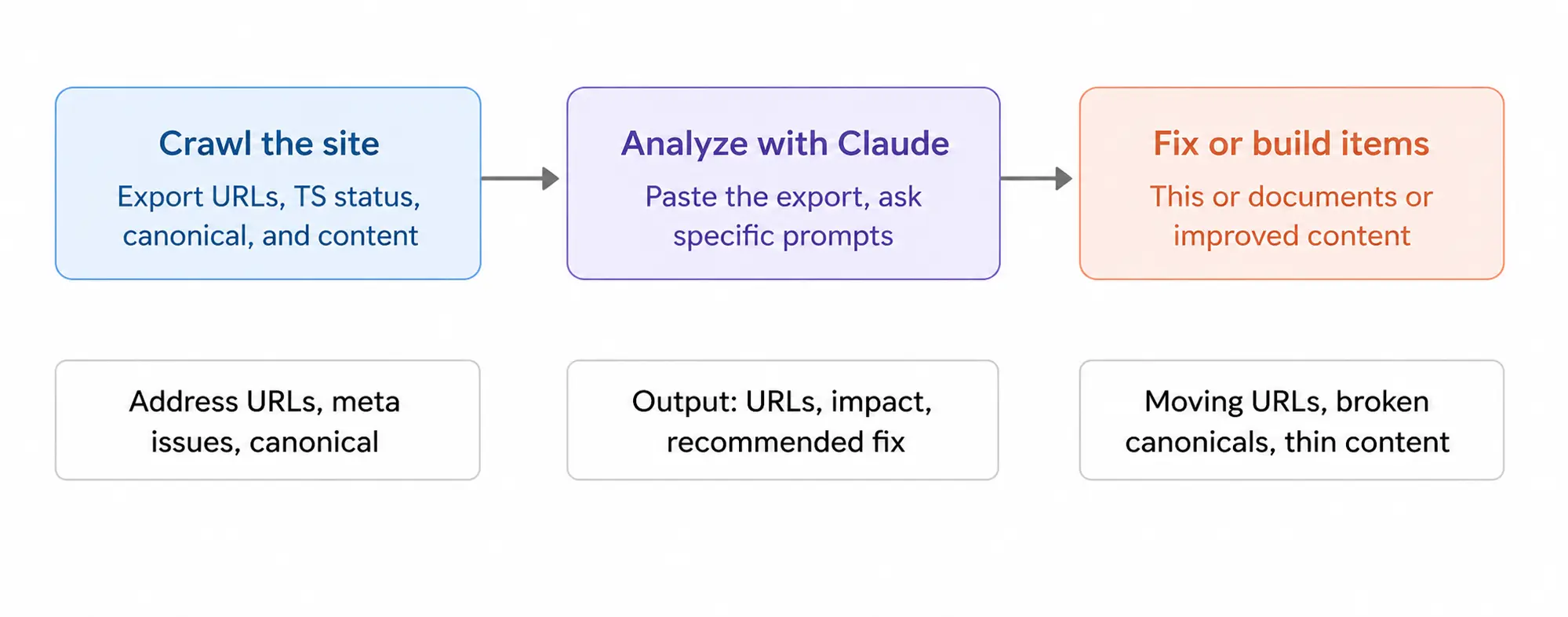
Step 1: Crawl your site with a website crawler and export these columns:
- Address, Title, Meta Description, H1, Status Code, Canonical, Word Count.
Step 2. Copy the cleaned export and paste it into Claude with a prompt such as this:
- Look at the Website Crawl report data below and identify some of the issues affecting the website for SEO. Check for duplicate or missing title tags, length of meta descriptions, missing H1 tags, non-200 status codes, broken or missing canonical tags, and pages with fewer than 300 words.
- Provide the answers in priority order, including the impacted URL, business impact, and a recommended solution.
- Here is the data: [PASTE CSV]
Step 3. Fix every Critical item before moving to Phase 2.
Missing titles and broken canonicals suppress rankings site-wide, not just on the individual page they sit on.
Phase 2: On-Page Review by Page Type
Generic on-page checklists waste time because a blog post and a service page succeed on completely different signals.
Step 1. Open your target page in Chrome, right-click, and choose View Page Source. Copy the full HTML.
Step 2: Provide a prompt that is relevant to the page. For a blog post:
- Perform an audit on this blog post HTML for the word [KEYWORD]. Check the title
- The length of the tags, the quality of the keywords, and the quality of the description meta tag.
- from a variety of search queries, a Key Takeaways section at the top, and sourced
- Statistics using named sources, visible author credentials, and at least
- 3 internal links, and an FAQ schema. PASS/WARN/FAIL each with a fix.
- HTML: [PASTE]
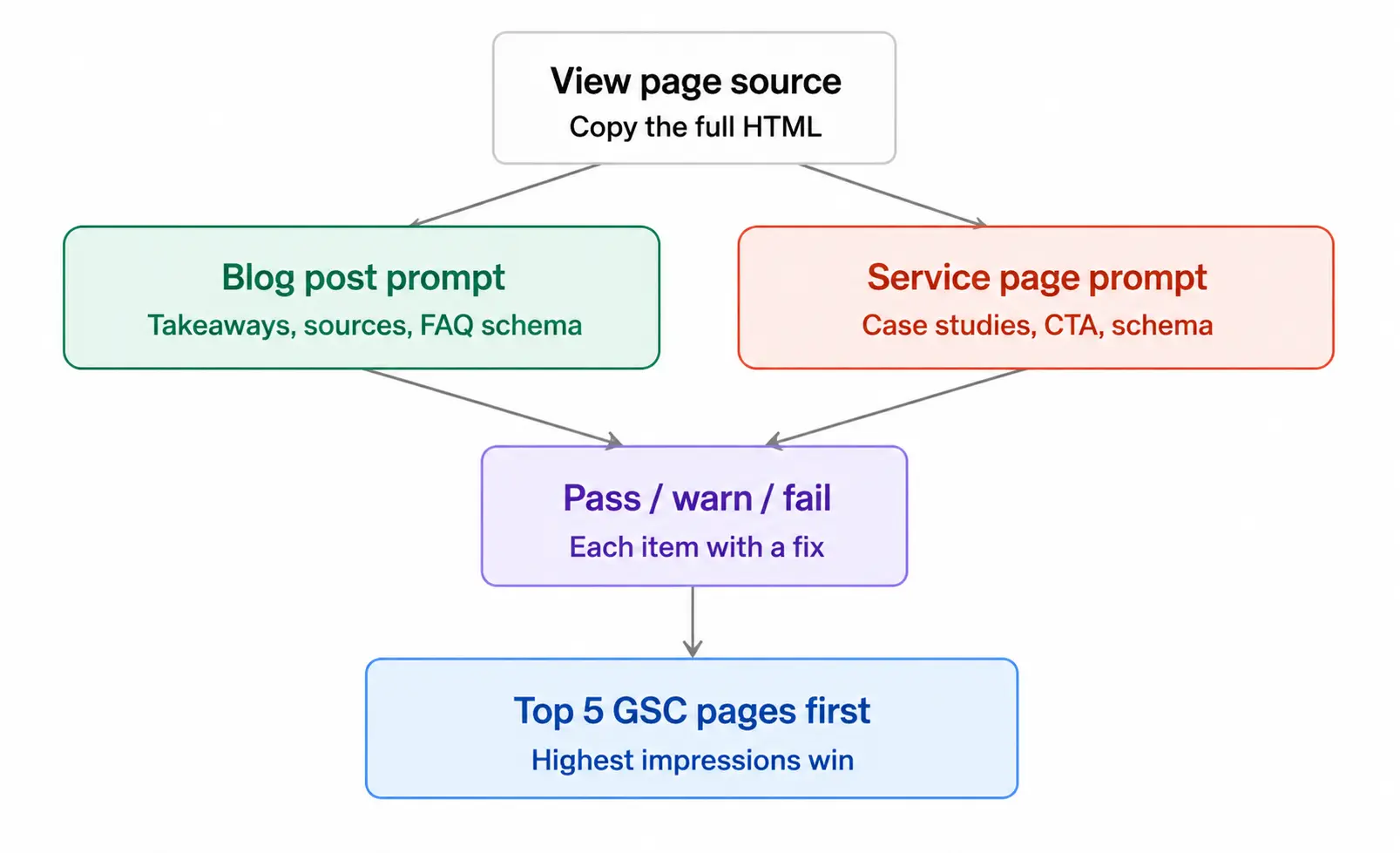
For a service page, swap the checklist items to proof elements like case studies, a visible call to action, and service schema instead of author bylines.
Step 3. Run this on your top 5 pages by impressions (GSC).
Start with the 5 pages with the deepest impressions on Google Search Console. The pages are visible in the wild, which is the reason why they are considered good candidates for a Claude SEO audit. Sometimes, optimizing pages that are already appearing in search results can get you results faster than optimizing pages that aren’t appearing in search results.
Phase 3: Content Quality Against Competitors
Tools like Surfer SEO charge upward of $89 to $170 a month for competitor content comparison. Claude performs the same analysis for free once you provide the competitor text yourself.
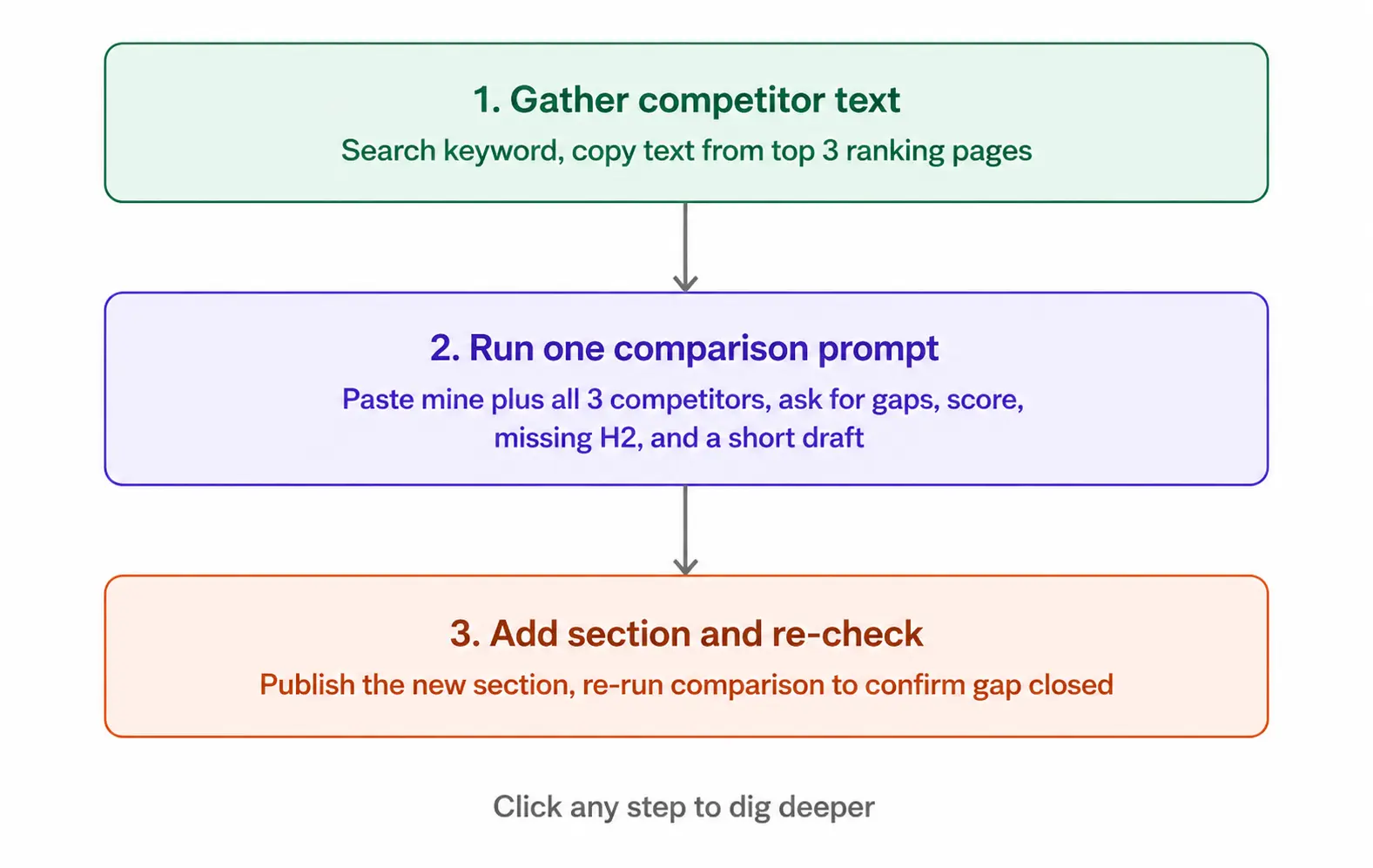
Step 1. Search your target keyword in an incognito window.
- Copy the visible text from the top three ranking pages.
Step 2. Include your text and all of your competitors in one prompt.
- Analyze and match my content with the top 3 ranking pages for [KEYWORD].
- What subtopics do they cover that mine are missing? What data points
- strengthen theirs? Score my content 1-10 against search intent. What
- is the single most important section I should add? Give me an H2
- heading and a short draft.
- Mine: [PASTE]. Competitor 1: [PASTE]. Competitor 2: [PASTE].
- Competitor 3: [PASTE].
Step 3. Add the missing section, then re-run the comparison after publishing to confirm the gap closed.
Phase 4: Internal Linking Gaps
Internal linking is consistently the weakest area on small business sites. Important service pages often sit as orphans, receiving almost zero internal links from blog content, which sends Google no authority signal about which pages actually matter.
Step 1. For example, you are using Screaming Frog:
- Go to Bulk Export and pull All Inlinks.
Step 2. Ask Claude to find the gaps:
- Here is my internal link export. My priority pages are: [LIST URLs
- and keywords]. Which have zero internal links? Which have fewer than
- 3? For each, suggest 3 existing pages with a natural link opportunity
- and the anchor text to use.
- Data: [PASTE]
Step 3. Include links as recommended.
A single well-placed internal link from a high-traffic page to an under-linked service page can shift rankings within weeks once Google’s crawler processes the new signal.
Phase 5: Search Console Quick Wins
- This stage identifies opportunities that are already available within your existing data, not new content.
Step 1. Download 90 days of Search Console performance data.
Step 2. Run this prompt:
- Find keywords ranking between positions 8 and 25 with over 50
- impressions in the last 90 days. Show position, impressions, CTR,
- and page. What’s the most likely reason each isn’t in the top 5?
- What’s the single highest-probability fix this week?
- Data: [PASTE]
Pages already ranking on page two typically need only a modest push. Industry CTR benchmarks put position 1 near a 27% click rate against roughly 2 to 4 percent for positions 11 through 15, so moving a page from position 12 to position 5 can multiply its clicks several times over without any new content at all.
Phase 6: AI Search Visibility
This is the phase most audit guides skip entirely, and it’s the phase separating a basic SEO checkup from genuine AI SEO Services. Research covering over a million verified ChatGPT citations found that 44% of them pull from the first third of an article, meaning content buried near the bottom of a page loses AI citation eligibility regardless of how well it ranks on Google.
Step 1: Install Open yourdomain.com, copy and paste it into Claude:
- Review access of ChatGPT-User, GPTBot, ClaudeBot, PerplexityBot, and ChatGPT-3.
- Googlebot. Mark if it is blocked, allowed, or not mentioned.
- Blocking ChatGPT-User does more than just hide and block ChatGPT; it also removes live visibility.
- Blocking GPTBot is only for training data.
- robots.txt: [PASTE]
Step 2. See if there is an llms.txt file in yourdomain.com/.Look for an llms.txt file in yourdomain.com/
- As of early 2026, less than 15 percent of websites contained one, meaning it’s still a very real advantage for your website to have one now compared to many other websites.
Step 3. Ensure you’ve been verified in Bing Webmaster Tools, as that’s where ChatGPT pulls its live data from, not Google.
Step 4. Check for author schema and visible bylines, since explicit author attribution correlates with higher AI citation rates in independent research on citation patterns.
Common Mistakes That Quietly Wreck Audit Quality
Even experienced users trip over the same handful of errors again and again.
- Asking for an audit without pasting data. Claude has no live crawl access by default, so a bare request produces a generic checklist instead of a real audit.
- Trusting stale data. An audit built on a two-week-old crawl reflects a site that no longer exists in that state.
- Writing vague prompts. Specify page type, target keyword, and CMS in every prompt to avoid generic output.
- Skipping the rendering check in Claude Code. JavaScript-heavy pages can appear blank to Puppeteer without an explicit render confirmation step.
- Forgetting to save output. Claude Code sessions vanish once closed unless you instruct Claude to write results to a file.
A Simple Monthly Rhythm
You don’t need to run all six phases every week. Spread the workload instead, the way an established AI SEO Services provider paces work across a full client roster.
Weekly, about 30 minutes: check for keywords moving into the 8-15 position range, add a handful of internal links, clear any lingering critical technical issues.
Monthly, about 90 minutes: run a fresh crawl, check content quality on your highest-impression lowest-CTR pages, pull a new GSC export, and confirm llms.txt still reflects your newest content.
Quarterly, about 3 hours: run all six phases across the full site, refresh statistics in your top five articles, and compare AI citation frequency before and after the quarter’s work.
Conclusion
Claude won’t replace your crawl tool, and it was never meant to. What it replaces is the analyst hours spent staring at spreadsheets, trying to work out what matters most. This is the real shift many AI SEO services agencies offer: not automation replacing strategy, but automation clearing the busywork so strategy gets the time it deserves. Paste real data. Ask sharp, specific questions.
Let Claude sort the noise from the signal and hand you a prioritized list instead of a wall of raw findings. Start with Phase 1 this week. Once it clicks, add the next phase and build your own repeatable audit system from there.
Want an SEO audit that goes beyond basic reports? ResultFirst combines Claude-powered analysis with expert strategy to deliver actionable insights that improve rankings and traffic. As a trusted AI SEO Services agency, we help you turn SEO data into measurable growth. Get your SEO audit today.
Sources Referenced:
- https://backlinko.com/claude-users
- https://seoprofy.com/blog/ctr-benchmarks-by-industry/
- https://searchengineland.com/chatgpt-citations-content-study-469483
FAQs:
WHAT TO READ NEXT
READY TO BUILD PREDICTABLE ORGANIC GROWTH?
We are the only TOP SEO services agency providing Real Results in a Real Performance model. We help growth hungry companies outperform their competition and achieve 300%+ growth in their digital marketing initiatives.
- San Jose, CA, 95120

- +1-888-512-1890

- sales@resultfirst.com

300K+
KEYWORDS RANKED
546M+
REVENUE GENERATED
18 Years
SOLVING COMPLEX SEO
150+
TEAM MEMBERS