



 sales@resultfirst.com
 +1-888-512-1890
WooCommerce SEO in 2026: Everything You Need to Know

WooCommerce SEO in 2026 starts with making your product catalog easy for Google to crawl, understand, and index. Google warns that poorly controlled URL variations can waste crawl resources, while duplicate URLs can dilute search value. For stores with thousands of products, variations, and filtered URLs, crawlability, canonicalization, internal linking, and structured data are essential SEO priorities.
Google also recommends a clear ecommerce site hierarchy and structured data to understand product relationships. For WooCommerce stores with size, color, or specification variants, ProductGroup structured data can help Google understand how those variants relate to the main product.
The opportunity is significant: Google says AI Overviews are now available in more than 200 countries and territories, expanding the number of search journeys where product information can be summarized directly in results. For WooCommerce stores, that makes accurate product attributes, structured data, clear category architecture, and helpful content increasingly important, not just for traditional rankings but also for AI-driven discovery.
This guide covers the WooCommerce SEO priorities that can directly affect visibility and conversions in 2026, including technical SEO, product-page optimization, schema, Core Web Vitals, internal linking, faceted navigation, and AI-search readiness.
What Is WooCommerce SEO?
WooCommerce SEO is the process of optimizing a WooCommerce-powered store so it’s more visible in traditional search engines like Google and in AI-based search tools like ChatGPT and Gemini. It covers technical site health, on-page product and category optimization, and structured data.
WooCommerce SEO differs from standard WordPress SEO because you’re not just optimizing text; you’re managing products, variations, faceted navigation, duplicate content generated by filters, and large volumes of images. Basic elements like title tags, meta descriptions, sitemap generation, and robots.txt are straightforward to implement, especially with plugins like Yoast SEO or Rank Math.
Why WooCommerce SEO Matters for Ecommerce Growth?
WooCommerce SEO helps your store attract high-intent shoppers, increase organic traffic, and generate sales without paying for every click. Unlike short-term paid campaigns, well-optimized product and category pages can continue bringing qualified visitors over time. It also strengthens your visibility across Google’s traditional results, AI Overviews, and other AI-powered search experiences.
Here’s why WooCommerce SEO belongs at the center of your growth plan:
Organic Traffic Sustainability: Organic search remains a major acquisition channel. Research found that organic search generated 53% of trackable website traffic, making it a stronger long-term traffic source than social and other non-search channels.
Lower Dependence on Paid Traffic. SEO gives ecommerce stores another source of qualified visitors without paying for every click. A 2025 study found that organic search continued to drive significantly stronger conversions than AI search, reinforcing the value of optimizing for traditional search while AI discovery develops.
Better Product Discoverability. Google says structured data can improve how accurately it understands ecommerce content. For WooCommerce stores, adding product information such as price, availability, reviews, and product relationships can help search engines interpret and surface products more effectively.
WooCommerce SEO Strategies for 2026
For growing WooCommerce stores, SEO needs to do more than increase rankings; it should help the right shoppers discover products, navigate the store, and move toward purchase. The strategies below focus on the areas that can strengthen organic visibility, improve product discoverability, and support sustainable ecommerce growth in 2026.
1. WooCommerce Technical SEO
This is the infrastructure layer, the settings that determine whether search engines and AI crawlers can even access your store cleanly. Skipping this section is the most common reason a content strategy underperforms.
- Enable HTTPS across the entire domain. Every page, and especially checkout, should force a secure connection. Google treats HTTPS as a baseline ranking signal, and browsers actively warn shoppers away from unsecured pages, a fast way to lose a sale at the worst possible moment.
- Choose hosting built for WooCommerce. Server response time sets the ceiling for everything else you do on speed. Look for managed WordPress or ecommerce-specific hosting with server-side caching, a CDN, and server locations close to your core market.
- Set a clean permalink structure. Under Settings > Permalinks, choose a product URL format that states the item plainly (e.g., /product-name/) rather than one loaded with IDs or parameters. Short, descriptive URLs are easier for both shoppers and crawlers to interpret.
- Confirm indexing isn’t blocked. After a migration, redesign, or staging deployment, check Settings > Reading to make sure “Discourage search engines from indexing this site” is unchecked. This single overlooked box has quietly de-indexed more stores than any algorithm update.
- Generate and submit an XML sitemap. Your sitemap should list only indexable pages, products, categories, and core content and exclude cart, checkout, and account pages. Most SEO plugins generate this automatically; submit it to Google Search Console and Bing Webmaster Tools once it’s live.
- Connect Google Search Console and Bing Webmaster Tools. These give you first-party visibility into indexing status, crawl errors, and which queries are actually driving traffic- data you can’t reliably get anywhere else.
- Install a dedicated SEO plugin. Yoast, Rank Math, or All in One SEO handle meta tags, sitemap generation, redirects, and basic schema in one place, which keeps technical SEO manageable as your catalog grows (more on choosing between them below).
- Set hreflang tags for multi-region stores. If you sell into more than one country or language, hreflang tags tell search engines which localized version of a page to serve, preventing duplicate-content conflicts between, say, your US and UK product pages.
2. Site Navigation, Usability, and User Experience
Search engines and AI systems both use engagement signals as a proxy for quality; a store that’s easy to navigate tends to perform better on both fronts.
- Turn on breadcrumbs. A visible trail like Home > Category > Subcategory > Product keeps users oriented and gives crawlers a clean internal-linking signal. Google frequently displays breadcrumbs directly in search results, which can lift click-through rate.
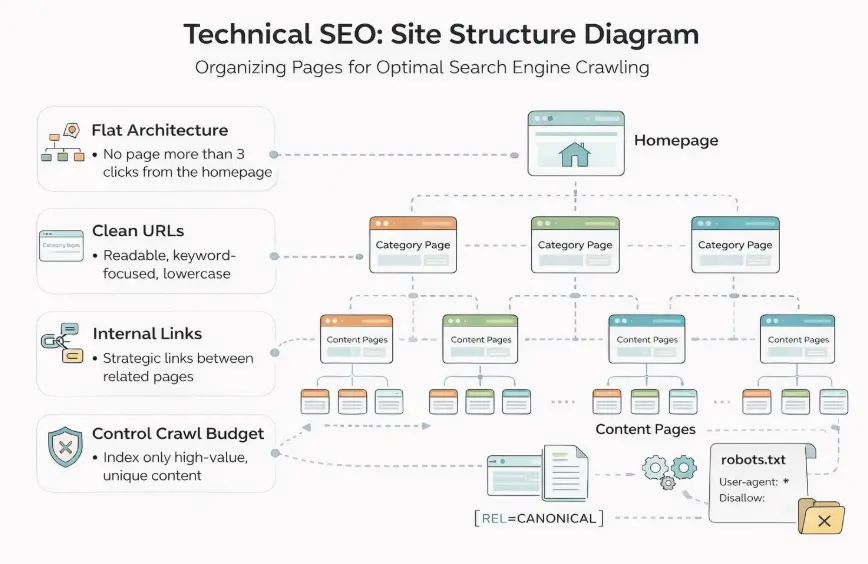
Build a shallow site structure.
Homepage
↓
Broad Categories
↓
Subcategories
↓
Product Pages
- Prioritize mobile responsiveness. Google indexes the mobile version of your site first, so navigation menus, product galleries, and touch targets need to work flawlessly on a phone, not just look acceptable on one.
- Meet Core Web Vitals. Core Web Vitals show whether your WooCommerce store loads quickly, responds smoothly, and stays visually stable. Google recommends LCP ≤ 2.5 seconds, INP ≤ 200 ms, and CLS ≤ 0.1 for a good experience.
For WooCommerce, start with the basics: compress product images, remove unnecessary plugins, use caching, optimize CSS/JavaScript, and lazy-load images. Check your Core Web Vitals regularly through PageSpeed Insights rather than treating speed as a one-time task.
Quick Comparison: Traditional SEO vs. AI Search Optimization for WooCommerce
Everything above sets the foundation. But traditional SEO and AI search optimization reward slightly different things on top of it; this table summarizes where to focus for each:
| Optimization Area | Focus | Example Action |
| Technical SEO | Crawlability & indexation | Canonical tags on filtered URLs |
| On-Page SEO | Product/category content | Keyword-rich titles, unique descriptions |
| Structured Data | Rich results | Product, Review, and FAQ schema |
| AI Search Optimization | Being surfaced in AI-generated answers | Conversational headings, direct answers, clear entity signals |
3. On-Page SEO for WooCommerce
With infrastructure and navigation handled, on-page work is where you tell search engines and AI systems exactly what each page is about.
- Research product keywords by intent, not just volume. Search volume alone doesn’t separate browsers from buyers. AI-driven search has shifted behavior from single-word queries (“earbuds”) to full sentences (“best wireless earbuds under $100 for workouts”), which makes long-tail, intent-based keywords more valuable than ever. Build your keyword plan around modifiers like:
- Use case (“best shoes for gym workouts”)
- Budget (“under $100,” “under $500”)
- Experience level (“for beginners,” “for professionals”)
- Location or urgency (“near me,” “buy online”)
- Write unique, keyword-oriented product titles. Your product pages are effectively landing pages. Titles should be concise and immediately understandable to both users and search engines, clear over clever.
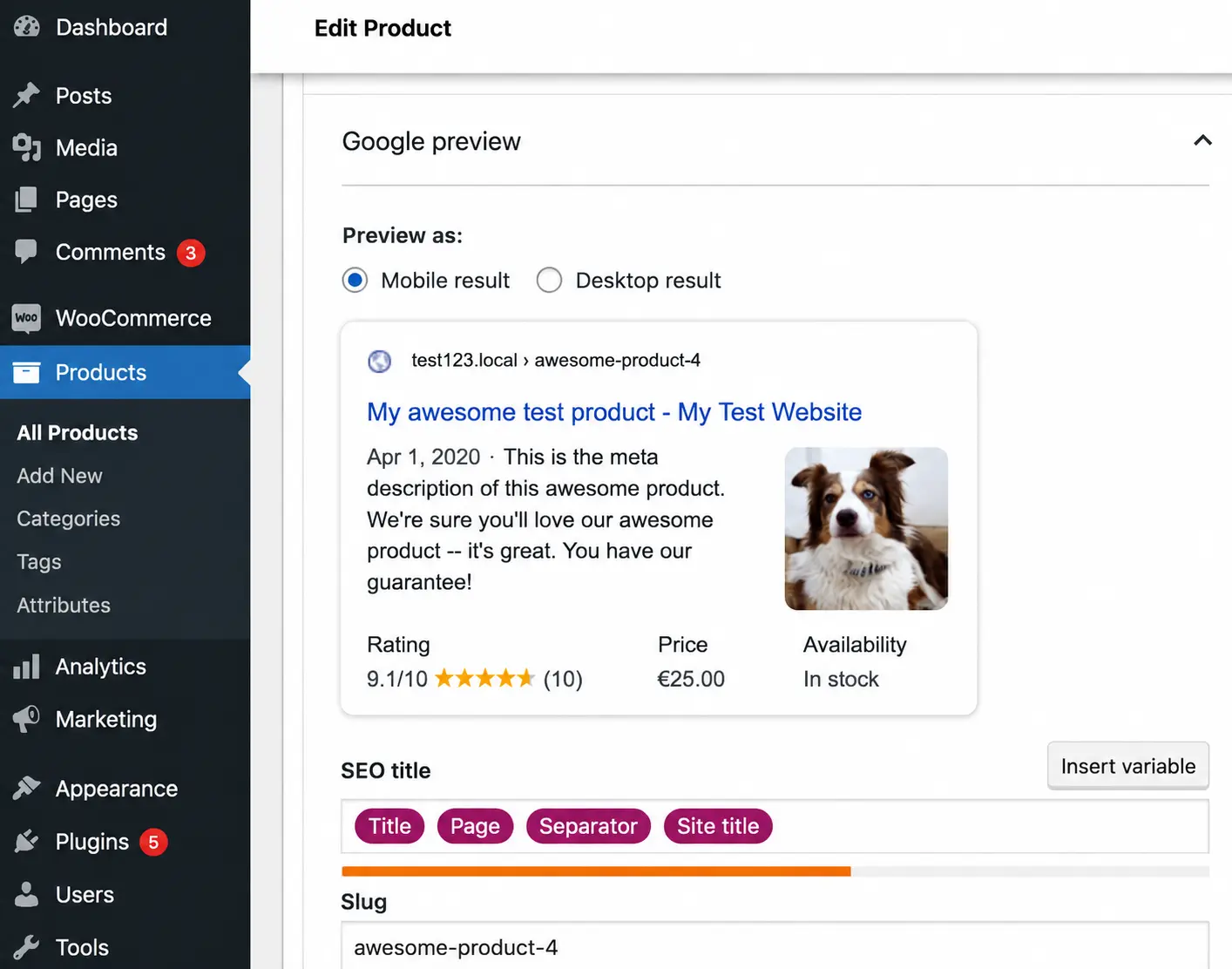
- Craft unique meta titles and descriptions. Meta descriptions aren’t a direct ranking factor, but they heavily influence click-through rate. Write a distinct 150–160 character description for every core page, highlighting a specific benefit or offer rather than reusing a template across the catalog.
- Structure clean, descriptive URLs. Keep them short, include the primary keyword, avoid unnecessary parameters, and use hyphens to separate words
. yourdomain.com/shop/waterproof-hiking-boots rather than a string of database IDs.
- Write genuinely unique product descriptions. Manufacturer boilerplate copy is one of the fastest ways to create duplicate content across the web, since dozens of other retailers are pasting the same text. Build out 200–300 words of original, scannable copy per core product, using bullet points for features and benefits and answering the real questions a buyer would ask before purchasing.
- Use categories and tags deliberately. Categories are your store’s primary departments; tags are narrower, cross-category filters (e.g., “eco-friendly,” “vegan leather”). Avoid tag bloat; every tag that generates a thin, near-empty archive page is a small drag on your site’s overall quality signal.
- Follow a clean heading hierarchy. Each page needs exactly one H1, typically the product or category name, with H2s and H3s organizing supporting sections like specifications, shipping information, or reviews.
- Add FAQs to product and category pages where relevant. Beyond the site-wide FAQ section, embedding a few page-specific Q&As captures long-tail search traffic and gives AI tools a directly extractable answer tied to that exact product or category.
- Link internally between related products and categories. Point flagship product pages toward relevant accessories, and link supporting content back to transactional categories, using descriptive anchor text rather than generic “click here” links.
4. Product Page SEO
Product pages are where search visibility meets purchase intent. For WooCommerce stores, optimize them around the information shoppers need to make a buying decision, while making product details clear enough for search engines to understand. Focus on complete product attributes, useful specifications, availability, pricing, reviews, and other purchase-related information that differentiates your pages from competing listings.
- Match products to search intent. Align each product page with the queries shoppers use when comparing or evaluating specific products, including relevant use cases, features, and purchase considerations.
- Make product information comprehensive. Include essential specifications, dimensions, materials, compatibility, shipping details, availability, and other information that helps customers evaluate the product without needing to search elsewhere.
- Differentiate product variations. Clearly communicate meaningful differences between sizes, colors, models, or specifications so shoppers and search engines can understand how variations relate to the primary product.
- Strengthen purchase confidence. Display genuine customer reviews, ratings, guarantees, return information, and other trust signals where relevant to help reduce uncertainty before purchase.
- Keep product information accurate. Regularly review pricing, stock status, product specifications, and discontinued products. Outdated information can create a poor user experience and weaken the usefulness of your product pages.
- Connect products within the catalog. Use relevant product recommendations, accessories, alternatives, and category links to help shoppers discover related items while creating stronger connections across your ecommerce site.
5. Image & Media Optimization
High-resolution product photography drives sales but can just as easily sink your Core Web Vitals if it’s mismanaged.
Add descriptive, keyword-aware alt text. Alt text supports accessibility and gives search engines context for Google Images and AI-powered visual discovery; describe what’s actually in the frame (e.g., “navy blue canvas tote bag”) without stuffing in extra keywords that aren’t accurate.
Compress every image before upload. Automated compression tools can shrink file sizes dramatically without a visible quality loss; this is one of the highest-leverage, lowest-effort fixes on most WooCommerce stores.
Use modern formats and descriptive file names.
Prefer WebP where supported, reserve JPEG for complex photography and PNG for graphics needing transparency, and rename files to reflect the product (navy-blue-canvas-tote.jpg) instead of leaving default camera filenames like IMG_9921.jpg.
6. Structured Data and Schema for WooCommerce SEO
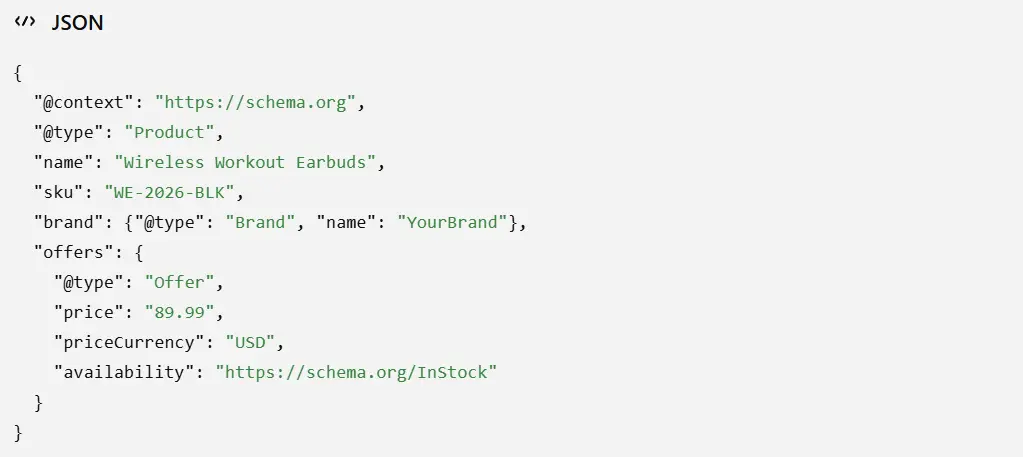
Schema markup translates your page content into a format search engines and AI systems can parse directly, rather than inferring from unstructured text. Industry analyses of schema-enhanced listings commonly report click-through-rate gains in the 20–30% range compared to standard listings, though the exact lift varies by query type and SERP competitiveness.<sup>[3]</sup>
1. Product schema. Defines price, currency, availability, and SKU so Google can generate a rich result that visually distinguishes your listing:
2. Review and rating schema. Surfaces aggregate star ratings directly in search results, which builds trust before a shopper even clicks through. Only mark up ratings that are genuinely collected from verified buyers.
3. Breadcrumb schema. Let Google render your category hierarchy in the SERP instead of a raw URL string, giving searchers immediate context about where a product sits in your catalog.
Validate every implementation with Google’s Rich Results Test before publishing, since malformed schema is worse than no schema at all.
7. Optimize for AI Search with Conversational Content
Search behavior is shifting from short keyword queries to full, conversational questions, and AI platforms answer those questions by extracting content directly from web pages rather than simply linking to them. This changes what “optimized” means for a product or category page.
Google reported that early AI Mode users were asking queries 2–3× longer than traditional searches, particularly for complex comparisons and questions.
How AI systems tend to extract and cite content. Based on how these tools currently operate, they generally favor content that states an answer plainly in the first sentence of a section, then supports it with specifics, rather than content that builds up to a conclusion.
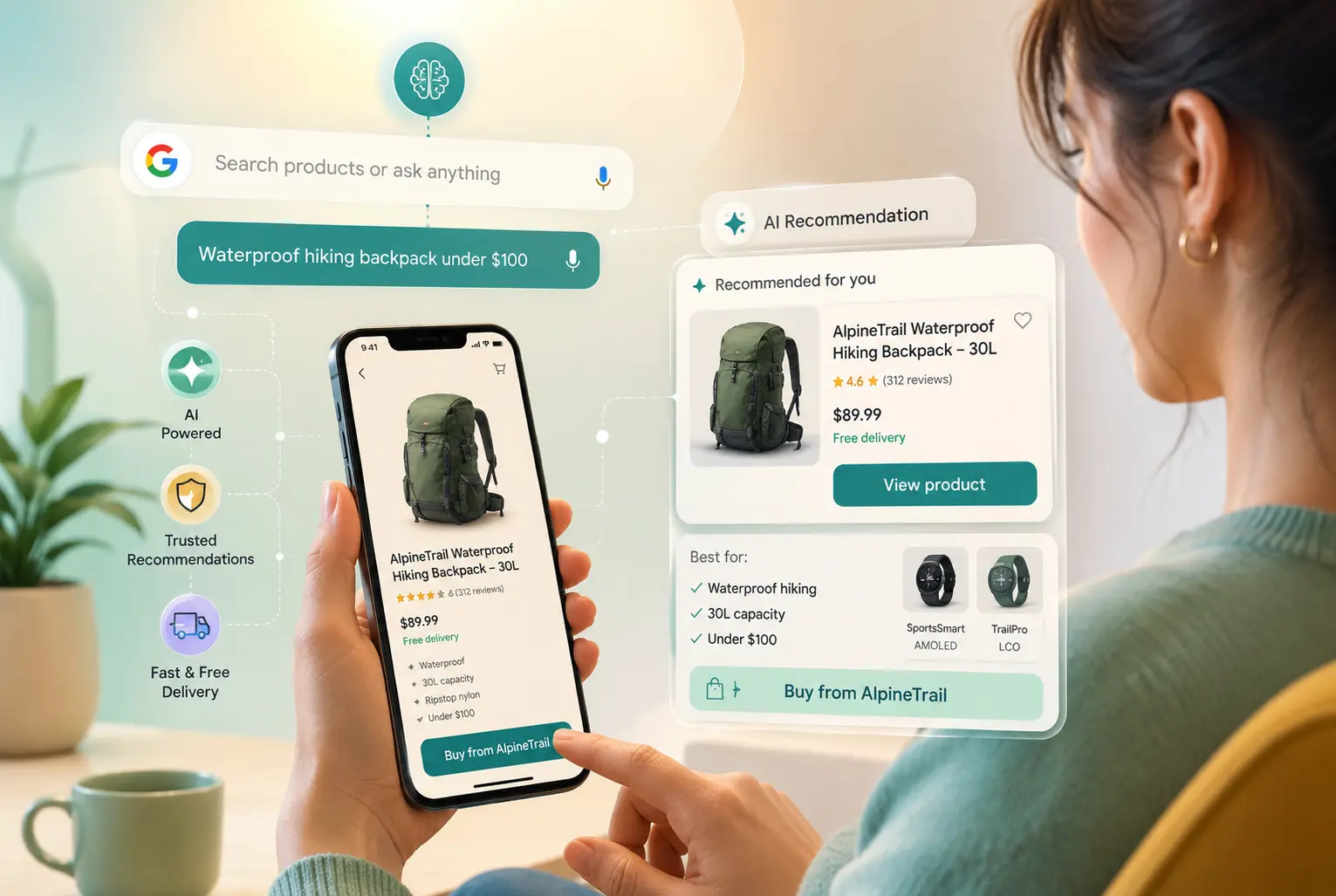
Clear headings phrased as questions, direct-answer paragraphs, and well-structured FAQ or comparison content appear to make extraction easier, which can help a page get pulled into an AI-generated answer. No platform publishes its exact selection criteria, so these should be treated as directional best practices rather than guarantees.
Why entity and brand clarity matters. AI systems appear to weigh how clearly a site establishes who is publishing the content and what it is. Consistent business name, address, and phone (NAP) details, a complete About page, author bylines with real credentials, and Organization/Product schema all seem to support a site being recognized as a legitimate, citable source, though this is inferred from observed patterns rather than a documented ranking formula.
- Use natural, conversational language rather than keyword-stuffed phrasing
- Add clear, one-sentence definitions and summaries near the top of key sections
- Build out FAQ sections with real, direct answers (not just questions)
- Structure content with descriptive headings and scannable bullet points
- Use schema markup consistently across products, reviews, and FAQs
This is also where scaling SEO work becomes a resourcing question; many stores bring in a WooCommerce SEO agency specifically to align content and technical setup with how AI-driven search is evolving, since it touches content, schema, and site architecture simultaneously.
8. Content and Link Building for WooCommerce
Technical and on-page work establish a baseline; content and links are what scale authority beyond it.
- Publish buying guides and informational content.
Top-of-funnel content, comparison guides, “best for” roundups, technical explainers, capture shoppers before they’ve settled on a specific product, and give you a natural place to link back to transactional category pages.
- Concentrate internal links on your highest-value pages. Point blog content and supporting pages toward your most profitable categories and flagship products, signaling their importance to crawlers rather than spreading link equity evenly across the catalog.
- Earn backlinks from relevant, reputable sources. Digital PR and genuine outreach to sites your customers already trust remain more durable than manipulative link schemes, which carry real penalty risk and rarely hold up over time.
- Put customer reviews to work. Reviews are a continuous source of authentic, keyword-rich content written in your actual buyers’ language. Solicit them consistently and mark them up with Review schema so they contribute to both trust and structured data.
9. Local SEO Recommendations for WooCommerce Stores
If your store operates a physical showroom, warehouse pickup, or retail location, local SEO bridges digital discovery and in-person revenue.
- Claim and complete a Google Business Profile. Keep your name, address, and phone number (NAP) exactly consistent with your website, add real photography and accurate hours, and respond to reviews.
- Get listed in relevant local directories. Replicate the same NAP details across industry and regional directories; consistency across the web is what validates a physical presence to search algorithms, not any single listing.
- Publish dedicated location pages if you have more than one storefront. Include an embedded map, a unique description per location, and LocalBusiness schema tying that page to its specific address.
10. WooCommerce Crawl & Indexation Management
WooCommerce stores can generate thousands of URLs through filters, product variations, sorting, and pagination. A clear crawl and indexation strategy helps search engines prioritize valuable pages while keeping low-value or duplicate URLs from creating unnecessary complexity.
- Manage crawl budget: Large WooCommerce stores can optimize their crawl budget by limiting unnecessary URL variations, helping search engines prioritize important product and category pages.
- Control faceted navigation: WooCommerce stores should manage faceted navigation carefully because filters for size, color, price, or brand can generate large numbers of URL combinations with limited search value.
- Canonical tags: Use canonical tags when multiple URLs contain similar or duplicate content to signal the preferred version and consolidate search signals around the URL you want indexed.
- Control duplicate content: Product variations, parameters, filters, and similar catalog pages can create duplicate or near-duplicate content. Consolidate or selectively exclude versions that don’t provide unique search value.
- Pagination: Handle pagination correctly by keeping deeper category and product listing pages accessible through crawlable links so search engines can discover products beyond the first page.
- Review indexing signals regularly: Check robots.txt, noindex directives, canonical tags, and Search Console indexing reports to identify settings that could prevent valuable pages from being discovered or indexed.
Find and Repair Broken URLs
Run regular crawls to identify 404 pages, broken internal links, and outdated product URLs. When a product has been permanently removed, redirect its old URL to the closest relevant product or category rather than sending visitors to an irrelevant page or leaving the URL broken.
11. Monitoring, Auditing, and Improving WooCommerce SEO
SEO isn’t a one-time deployment; it needs a light ongoing cadence to stay effective.
Track performance in GA4 and Search Console. Watch organic traffic volume, engagement, and most importantly, which queries are actually converting into revenue, not just impressions.
Run a technical audit on a regular cadence. A full review of crawl health, content relevance, and backlink integrity every six months catches architectural issues before they cause a sudden traffic drop.
Monitor keyword rankings, but expect some volatility. Minor fluctuation is normal; sustained, multi-week drops on core commercial terms are the signal worth investigating.
Let the data steer the roadmap. Double down on tactics with clear, measurable impact on revenue, and be willing to pull back from ones that aren’t moving the numbers, rather than treating the original plan as fixed.
Best WooCommerce SEO Plugins
Plugins won’t replace a full strategy, but they handle the day-to-day mechanics well:
- Yoast SEO / Rank Math: The industry standards. Both handle meta tags, sitemaps, and basic schema markup; Rank Math offers more granular WooCommerce-specific controls.
- WP Rocket / LiteSpeed Cache: Caching plugins that are close to essential for meeting Core Web Vitals thresholds.
- WPSSO Core: One of the more complete schema markup systems available, covering hundreds of schema types and helping resolve Google Merchant Center errors.
- All in One SEO: A full-featured WordPress SEO plugin with premium WooCommerce features for product and category page optimization.
How a WooCommerce SEO Agency Can Help Grow Your Store
As a catalog grows, SEO management gets genuinely harder to do well in-house; this is where a WooCommerce SEO agency typically adds the most value. Agencies bring dedicated resources and pattern recognition from managing multiple stores, rather than working from a single site’s trial and error.
A specialized agency typically covers:
- Technical audits: identifying canonical tag conflicts, broken schema, and crawl errors that are easy to miss without dedicated tooling.
- Content strategy: building category pages and “best for” guides targeting high-intent, long-tail keywords, which matter increasingly for surfacing in AI Overviews.
- Performance optimization: configuring image delivery, caching, and hosting to consistently pass Core Web Vitals.
- AI search optimization: structuring content so it’s more legible to AI engines generating shopping-related answers, increasing the chance products are mentioned in generative responses.
Conclusion
WooCommerce SEO in 2026 is no longer just about adding keywords to product pages. It’s a system that stacks in layers: secure, fast infrastructure; clean navigation; original on-page content; structured data; and AI-search readiness, each one compounding on the last. Stores built this way are simply easier for both search engines and AI systems to understand and easier for shoppers to buy from.
If you’d rather skip the trial-and-error phase, working with a performance-driven partner can shorten the timeline considerably. As a performance-based ecommerce SEO agency, ResultFirst helps ecommerce brands implement data-backed WooCommerce SEO strategies focused on measurable outcomes rather than vanity rankings, from technical fixes to AI-driven visibility. If you’re ready to turn your store into a more consistent revenue engine, now is a reasonable time to start.
Sources Referenced:
- https://developers.google.com/search/docs/appearance/structured-data/product-variants
- https://blog.google/products-and-platforms/products/search/ai-overview-expansion-may-2025-update/
- https://contentmarketinginstitute.com/content-distribution-promotion/organic-search-traffic-one-of-the-best-reasons-for-content-marketing/
- https://www.brightedge.com/resources/research-reports/ai-search-visits-in-surging-2025/
- https://developers.google.com/search/docs/appearance/core-web-vitals/
- https://blog.google/intl/en-in/products/google-search-introducing-ai-mode-in-india/
FAQs:
WHAT TO READ NEXT
READY TO BUILD PREDICTABLE ORGANIC GROWTH?
We are the only TOP SEO services agency providing Real Results in a Real Performance model. We help growth hungry companies outperform their competition and achieve 300%+ growth in their digital marketing initiatives.
- San Jose, CA, 95120

- +1-888-512-1890

- sales@resultfirst.com

300K+
KEYWORDS RANKED
546M+
REVENUE GENERATED
18 Years
SOLVING COMPLEX SEO
150+
TEAM MEMBERS